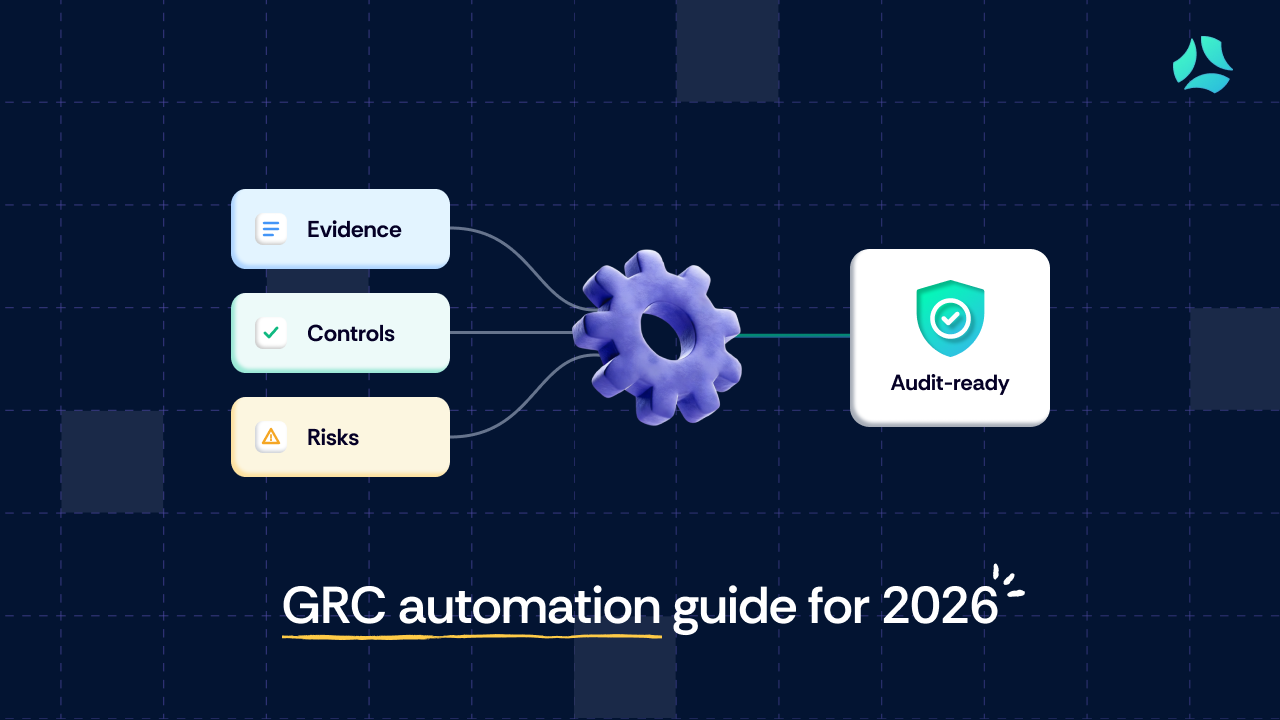


- GRC automation helps streamline compliance by automating tasks like evidence collection, control monitoring, risk assessment, and audit tracking. It reduces repetitive work but does not eliminate the need for human review, coordination, and ownership.
- While automation improves efficiency in high-volume, repeatable workflows, teams still lose time in areas like reviewing evidence, handling exceptions, resolving integration gaps, and coordinating across functions. In many cases, automation shifts effort rather than removing it.
- GRC automation delivers the most value when workflows are clearly defined, ownership is established, and systems are well integrated. To reduce compliance effort effectively, teams should focus on standardizing processes and automating the right tasks instead of trying to automate everything.
If you have worked on SOC 2 or ISO 27001, you have probably already felt this. You invest in automation, expecting compliance to get easier, but the workload does not really go down.
Evidence still needs to be checked. Teams still need follow-ups. Auditors still come back with questions that require manual answers. The tools help, but they do not reduce the effort in the way most people expect.
That gap between expectation and reality is where most GRC automation conversations fall short.
This guide focuses on that gap. Not just what GRC automation is, but what it actually changes in your day-to-day work. Where it reduces effort, where it does not, and what needs to be fixed before automation starts delivering real value.
What is GRC automation?
GRC automation refers to the use of software to streamline governance, risk, and compliance processes that are traditionally handled manually.
Instead of collecting evidence, tracking controls, and managing audits through spreadsheets and emails, teams use automation to centralize these activities and reduce repetitive work.
At a basic level, GRC automation helps with:
- Collecting evidence from integrated systems
- Mapping controls to frameworks like SOC 2 or ISO 27001
- Assessing, documenting, and tracking risks and remediation activities
- Monitoring controls continuously instead of at a single point in time
- Tracking audit progress and maintaining documentation
The goal is not to remove human involvement entirely, but to reduce the amount of manual effort required to manage compliance.
Why is GRC automation important?
As companies scale, compliance quickly becomes harder to manage manually.
Multiple frameworks, recurring audits, and cross-team dependencies make it difficult to track what is done, what is pending, and who is responsible. Without a structured system, teams end up relying on spreadsheets, ad hoc follow-ups, and fragmented documentation.
This is exactly where GRC automation becomes important. It helps bring structure, visibility, and consistency to compliance workflows.
For example, at CloudSEK, compliance work was spread across teams like security, HR, legal, and engineering, with much of it tracked manually. This led to duplicated effort, unclear ownership, and constant follow-ups for recurring audit tasks.
By centralizing compliance workflows and automating recurring tasks, they were able to reduce coordination overhead and avoid rebuilding the same audit processes every cycle.
GRC automation helps address these challenges by:
- Reducing time spent on repetitive tasks like evidence collection
- Providing visibility into compliance status across teams and systems
- Standardizing workflows so work does not have to be rebuilt each audit cycle
- Supporting continuous compliance instead of point-in-time preparation
At the same time, automation does not eliminate the need for review, coordination, or ownership. Its impact depends on how well these processes are structured.
What parts of the GRC process can you automate?
GRC automation applies across the entire compliance lifecycle. Instead of managing workflows across spreadsheets, emails, and disconnected tools, automation brings them into a centralized system and reduces repetitive work.
Here is how automation typically fits into key GRC processes:
Compliance monitoring and gap detection
Automation continuously checks whether controls are working as expected by integrating with systems like cloud infrastructure, identity providers, and code repositories.
Instead of manually verifying configurations or reviewing logs during audits, teams get automated alerts when controls fail, configurations drift, or required controls are missing. This shifts many technical compliance tasks from periodic checks to continuous monitoring.

Risk identification and assessment
Automation structures how risks are identified, assessed, and tracked across the organization.
It centralizes risk registers, standardizes assessment templates, and applies scoring models based on predefined criteria. Potential risks can also be flagged automatically from events such as failed controls or vendor assessments, reducing the need for manual identification.
Policy management
Automation streamlines the entire policy lifecycle, from creation to enforcement.
Teams can use pre-built templates aligned with frameworks, maintain a centralized repository, and automate policy distribution. Acceptance tracking and reminders ensure that employees review and acknowledge policies without manual follow-ups.
Audit documentation and evidence collection
Automation reduces the effort required to collect, organize, and maintain audit evidence.
Instead of manually gathering screenshots, logs, and documents, evidence is pulled directly from integrated systems and mapped to relevant controls. Audit trails are automatically maintained, and documentation is stored in a centralized location.
Third-party risk management
Automation simplifies how organizations assess and monitor vendor risk.
It enables standardized vendor onboarding, automated questionnaire distribution, centralized document collection, and consistent risk scoring. Changes in vendor status or missing documentation can trigger alerts, reducing manual tracking.

Security questionnaires
Automation reduces the repetitive effort involved in responding to security questionnaires.
Responses are generated or suggested using a centralized knowledge base that maps past answers, policies, and controls to new questionnaires. Teams can review and customize responses instead of starting from scratch each time.
Risk mitigation and compliance tracking
Automation helps ensure that identified risks and compliance gaps are actually resolved.
It assigns remediation tasks, sends automated reminders, and tracks progress through dashboards. This reduces reliance on manual follow-ups and improves accountability across teams.
Where automation helps at scale
As compliance programs mature, the biggest gains come from reducing coordination overhead across teams.
Automation helps by standardizing evidence collection, control monitoring, and approval workflows, reducing the need for constant follow-ups and status checks across security, engineering, and business teams.
This creates a more predictable operating model in which compliance activities occur continuously rather than as periodic, resource-intensive projects.
What GRC automation does not automate
GRC automation can reduce a significant amount of manual effort, but it does not eliminate the need for human involvement.
Most compliance workflows still depend on context, judgment, and coordination across teams. These are areas where automation has limited impact.
Context and validation
Automation can collect evidence, but it cannot always determine whether that evidence is complete, relevant, or aligned with audit expectations.
Teams still need to review outputs, validate accuracy, and ensure that controls are properly implemented. This is especially true when dealing with complex environments or evolving requirements.
Cross-team coordination
Compliance is rarely owned by a single team. It involves engineering, HR, legal, and security working together.
Automation can assign tasks and send reminders, but it cannot ensure that stakeholders respond on time or provide the right inputs. Follow-ups, clarifications, and dependencies still require manual effort.
Exception handling
Not every scenario fits into a predefined workflow. Controls may fail for valid reasons, systems may not integrate cleanly, and auditors may request additional context. These situations require manual intervention and decision-making that automation cannot fully handle.
Audit interactions
Automation can prepare documentation, but it cannot replace conversations with auditors.
Teams still need to explain decisions, provide context, and respond to follow-up questions. This part of the process remains largely manual and often time-intensive.
Ownership and accountability
Automation can track tasks, but it does not create ownership.
Without clearly defined responsibilities, tasks can still be delayed or missed. Teams need to ensure accountability across functions, which goes beyond what automation alone can enforce.
Governance decisions
Automation can surface risks, exceptions, and control failures, but decisions about risk acceptance, remediation priorities, and policy exceptions still require human judgment. These decisions depend on business context and cannot be fully automated.
Where teams still lose time with GRC automation
GRC automation reduces a lot of repetitive work, but it does not remove the effort required to keep compliance running smoothly.
For most teams, the time does not disappear. It shifts. Instead of collecting evidence manually, teams spend time reviewing it. Instead of tracking tasks in spreadsheets, they follow up across tools. The work becomes less visible, but it is still there.
Here are the areas where teams typically continue to lose time, even after adopting automation.
Following up on incomplete or delayed inputs
Automation can assign tasks and send reminders, but it cannot ensure that stakeholders respond on time or provide complete information.
Compliance depends on inputs from multiple teams. When evidence is delayed or incomplete, someone still has to follow up, clarify requirements, and close the loop manually.
Reviewing and fixing collected evidence
Automatically collected evidence is not always audit-ready.
It may be incomplete, incorrectly mapped, or missing context required for auditors. Teams still need to review outputs, validate them, and fix gaps before submission.
In many cases, this review layer takes as much time as collection, especially when controls are complex or systems are not fully aligned.
Resolving mismatches across systems
Automation depends on integrations, but those integrations are not always seamless.
Data may not map cleanly between systems, controls may be duplicated, or evidence may not align with audit expectations. These mismatches require manual intervention to identify and resolve.
Handling exceptions and edge cases
Not every compliance scenario fits into a predefined workflow.
Controls may fail for valid reasons, environments may behave differently, and auditors may request additional context. These situations cannot be fully automated and require manual handling.
Coordinating across teams
Compliance is a cross-functional effort involving engineering, HR, legal, and security.
Automation improves visibility, but it does not eliminate the need for coordination. Teams still need to align on ownership, timelines, and responsibilities, which often involves back-and-forth communication.
Maintaining controls and framework mappings
As frameworks, systems, and business processes evolve, teams need to review control mappings and update compliance documentation. Automation can help manage these relationships, but it cannot determine whether mappings remain appropriate as requirements change.
What this means in practice
GRC automation does not fall short because of missing features. It falls short when the surrounding workflows are not clearly defined.
The biggest time savings come not just from automating tasks, but from reducing friction between systems, teams, and processes.
That is the difference between automation that looks efficient and automation that actually reduces effort.
When GRC automation actually works
GRC automation delivers real value when it is built on top of structured processes, not used to fix broken ones.
Teams that see meaningful time savings are not just automating tasks. They are simplifying how compliance work is defined, owned, and executed before automation is introduced.
In practice, GRC automation works best under the following conditions:
When processes are mature and repeatable
Automation delivers the most value when compliance activities follow a consistent process. If workflows change frequently or are handled differently across teams, automation can amplify inconsistencies instead of reducing effort.
When workflows are clearly defined
Automation works best when there is clarity on what needs to be done.
Controls are mapped properly, evidence requirements are standardized, and workflows follow a consistent structure. This allows automation to execute tasks reliably instead of creating confusion around what is expected.
When ownership is clearly assigned
Automation can track tasks, but it cannot enforce accountability.
Teams that benefit from automation have clear ownership across functions. Each control, task, and workflow has a defined owner, which reduces delays and avoids repeated follow-ups.
When systems are properly connected
Automation depends on integrations to function effectively.
When systems are connected, evidence flows automatically, monitoring becomes reliable, and data stays consistent. When they are not, teams end up manually filling gaps, which reduces the value of automation.
When automation is applied selectively
Not every part of compliance should be automated.
High-volume, repeatable tasks benefit the most. Trying to automate complex or context-heavy work often creates more overhead instead of reducing it.
Teams that see the most impact focus automation where it actually reduces effort.
When the goal is to reduce coordination
The biggest gains from automation do not come from faster tasks. They come from reducing coordination overhead.
Fewer follow-ups, clearer workflows, and better visibility across teams have a greater impact than automating individual steps in isolation.
How to actually reduce compliance effort with GRC automation
Automation alone does not reduce effort. How it is implemented does.
If the goal is to save time, the focus should be on simplifying workflows before scaling them.
Start with your most repetitive workflows
Identify tasks that happen frequently and follow a predictable pattern.
This typically includes:
- evidence collection
- control monitoring
- security questionnaires
Automating these areas delivers immediate value because they consume a large portion of compliance time.
Measure where time is actually spent
Before automating a workflow, identify where teams spend the most time. Tasks that are frequent, repetitive, and involve significant manual effort typically provide the highest return on automation.
Fix ownership before automating workflows
If it is unclear who is responsible for a task, automation will not solve the problem.
Define ownership at the control and workflow level first. Once accountability is clear, automation can help enforce timelines and improve consistency.
Standardize before you scale
Automation amplifies whatever process already exists.
If workflows are inconsistent or poorly defined, automation will scale that inefficiency. Standardizing processes before automating them ensures better outcomes.
Reduce dependencies across teams
A large portion of compliance effort comes from waiting on others.
Look for ways to:
- centralize information
- reduce back-and-forth communication
- make requirements easier to access
The less coordination required, the more effective automation becomes.
Do not try to automate everything
Over-automation often creates more complexity.
Focus on areas where automation clearly reduces effort. Leave room for manual handling where context, judgment, or flexibility is required.
Conclusion
GRC automation is often positioned as a way to eliminate manual work. In practice, it changes the nature of that work.
It reduces effort in areas like evidence collection, monitoring, and tracking. But it does not remove the need for review, coordination, or ownership.
The difference between automation that works and automation that does not comes down to how well the underlying processes are structured.
When workflows are clear, ownership is defined, and systems are connected, automation can significantly reduce compliance effort. Without that foundation, it simply shifts work from one place to another.
The goal is not to automate everything. It is to remove friction from the parts of compliance that slow teams down the most.
If you want to see how this works in practice, schedule a demo with Scrut to explore how you can reduce compliance effort without adding complexity.
GRC automation uses software to streamline governance, risk, and compliance processes such as evidence collection, control monitoring, risk assessment, policy management, and audit tracking. It works by integrating with existing systems to collect data automatically, map it to controls, and provide continuous visibility into compliance status. The goal is to reduce repetitive manual work, not eliminate human involvement entirely.
GRC automation can save time, but only in specific areas. It reduces effort in repetitive tasks like evidence collection, monitoring, and reporting. However, teams still spend time on reviewing outputs, coordinating across teams, and handling exceptions. The biggest time savings come when workflows are clearly defined and ownership is established before automation is implemented.
Common areas that can be automated include compliance monitoring, risk assessment, policy management, governance workflows, audit documentation, third-party risk management, and security questionnaires. These are typically high-volume, repeatable tasks where automation can reduce manual effort and improve consistency.
GRC automation cannot fully handle tasks that require context, judgment, or coordination. This includes validating evidence, managing cross-team dependencies, handling exceptions, and interacting with auditors. These areas still require manual effort, which is why automation alone does not eliminate compliance workload.
To get the most value from GRC automation tools, focus on structuring your processes before automating them. Define clear ownership, standardize workflows, and prioritize automating repetitive tasks first. Avoid trying to automate everything. The goal should be to reduce coordination and friction, not just digitize existing manual processes.


%201.png)