


%20(1).png)


Enterprise buyers ask for SOC 2 reports every day, but few people on either side of the table are trained on how to read them. That knowledge gap matters. A SOC 2 report isn’t a simple pass/fail stamp; it’s an attestation, and understanding that distinction changes how you interpret every page.
This guide is for GRC leads, security teams, founders, and CTOs preparing for an upcoming audit or evaluating a vendor’s report. By the end, you will know what each section contains, how auditor opinions differ, and where common blind spots occur.
Key takeaways
- A SOC 2 report is an attestation document, not a certificate, prepared by a licensed CPA firm after auditing your security controls against the AICPA’s Trust Services Criteria.
- It comes in two forms: Type 1 (control design at a point in time) and Type 2 (operating effectiveness over 3 to 12 months). Most enterprise buyers require Type 2.
- Every SOC 2 report has four required sections and one optional section. The auditor's opinion, not the management assertion, is the element you check first.
- SOC 2 reports are restricted-use documents. Sharing one usually requires an NDA.
What is a SOC 2 report? (And what it is not)
A SOC 2 report is an attestation prepared by a licensed CPA firm that describes an organization’s information security controls and whether they meet the AICPA’s Trust Services Criteria: security, availability, processing integrity, confidentiality, and privacy.
The word attestation matters. SOC 2 produces a report, not a certificate. There is no such thing as a “SOC 2 certificate,” and any vendor claiming one is describing something that does not exist.
ISO 27001, by contrast, is a certification. An accredited body audits your management system and issues a certificate valid for three years. SOC 2 works differently: the CPA firm expresses a professional opinion, and that opinion is the report. A document assembled internally, with a management write-up but no CPA firm’s opinion, is not a valid SOC 2 report, no matter how polished it looks.
One more thing most people miss: SOC 2 reports are restricted-use documents. They are not public. Organizations share them with prospects, customers, and auditors under an NDA because they contain detailed descriptions of systems, controls, and test results.
There are two types. A SOC 2 Type 1 reviews the design of your controls as of a single date. A SOC 2 Type 2 assesses whether those controls operated effectively over a defined period, typically three to twelve months. Type 1 proves you built the right controls; Type 2 proves they actually worked over time.
SOC 2 Type 1 vs. SOC 2 Type 2 summary comparison
For a walkthrough of setting up either type, see our SOC 2 audit setup guide.
Who needs a SOC 2 report?
The trigger for a SOC 2 report is almost never regulatory. It is commercial: a buyer asks for one, and the deal does not move until you produce it.
That buyer is usually an enterprise or mid-market company whose procurement or InfoSec team vets every vendor that touches its data. If your organization stores, processes, or transmits customer data on behalf of clients, you are the kind of service organization they will ask about.
In practice, that means:
- SaaS providers
- Cloud infrastructure companies
- Managed service providers
- Data centers
- HR and payroll platforms
- Healthcare technology companies
In some markets, a SOC 2 is functionally mandatory long before it is ever legally required. Financial services, healthcare, government procurement, and enterprise software sales cycles routinely stall without one. Your buyer does not care that it is voluntary; they care that their own vendor risk program requires it before they can sign.
Because a SOC 2 unblocks revenue rather than satisfying a regulator, it is worth understanding how SOC 2 compliance accelerates deals rather than treating it as pure overhead.
Two related reports come up in the same conversation: SOC 1, which covers controls affecting financial reporting, and SOC 3, a public-facing summary of a SOC 2 Type 2 that you can share without an NDA.
For a full comparison of when each applies, see the SOC 1 vs. SOC 2 vs. SOC 3 section below.
What does a SOC 2 report cover?
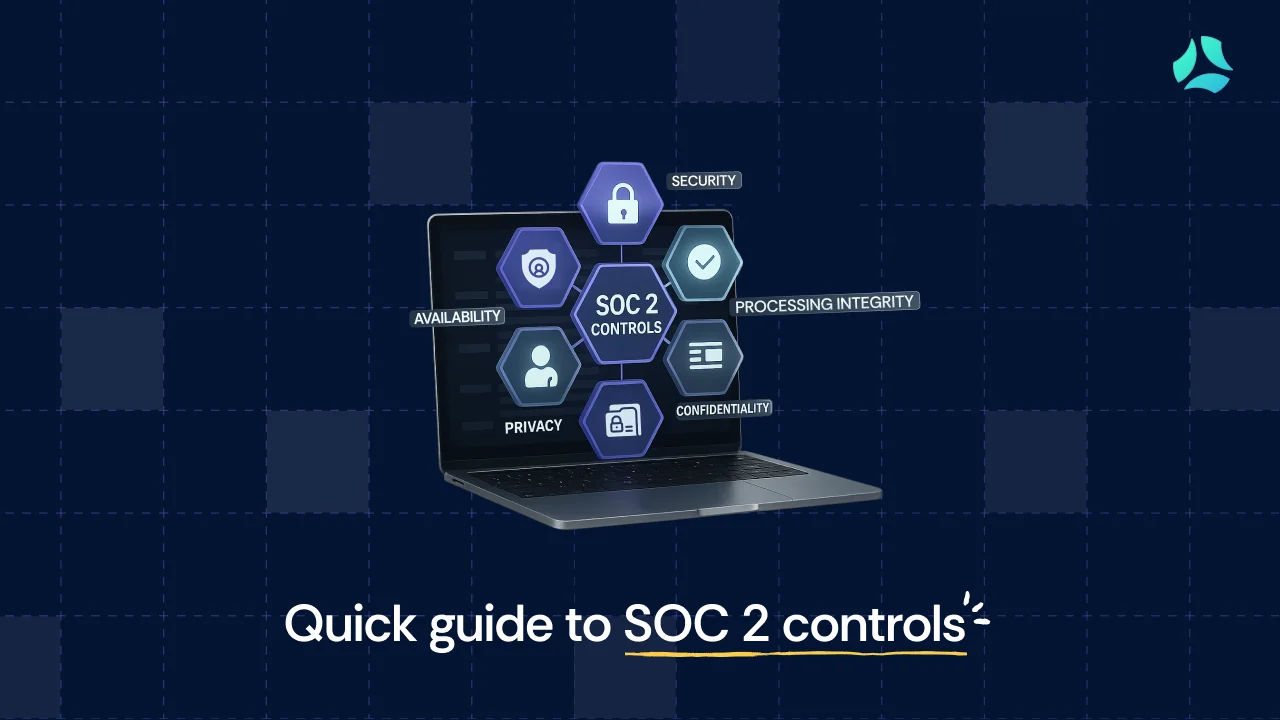
A SOC 2 report covers your controls against one or more of the five Trust Services Criteria. Security, also called the Common Criteria, is mandatory in every SOC 2 report. The other four are optional, and you include them based on the nature of your service and the risk questions your clients ask most.
Selection is a cost and relevance decision, not a checkbox exercise. Kush Kaushik, Co-founder at Scrut Automation, puts the cost of adding Confidentiality and Availability to a Security-only scope at roughly 1.2X; modest given that uptime and data handling are exactly what enterprise buyers probe first.
Processing Integrity applies mainly to organizations doing batch data processing or financial transactions. Privacy applies to organizations handling personal information (PII). If neither describes your service, you do not need them.
One caution: do not include criteria that do not apply to your service. Auditors and sophisticated buyers notice, and it undermines the report’s credibility.
SOC 2 Trust Services Criteria inclusion guide
To see how criteria map to concrete controls, review our SOC 2 controls list.
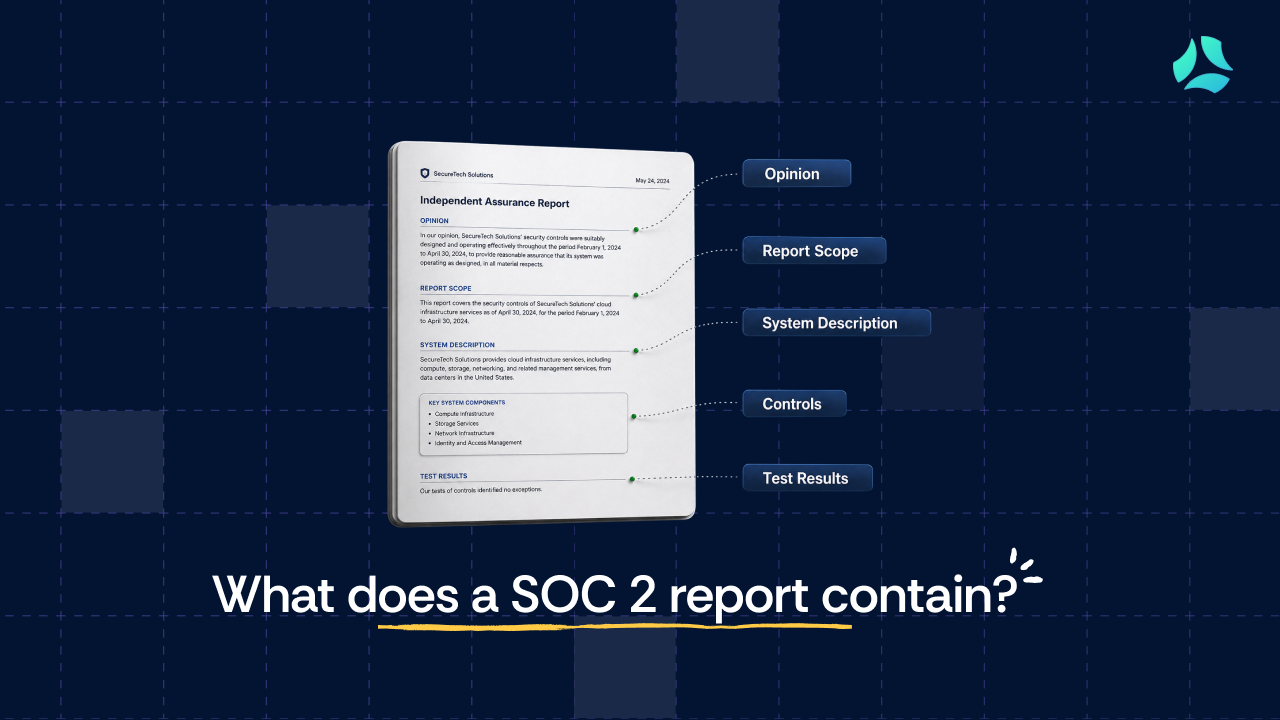
What’s included in a SOC 2 report? The 5 sections explained
Every SOC 2 report follows the AICPA structure: four required sections and one optional one. Here is what each contains and what to look for as a reader.
1. Independent auditor’s opinion
What it is: The CPA firm’s professional conclusion on whether your system description is fairly presented and whether your controls were suitably designed and, for a Type 2, operating effectively over the period.
What to look for: This is the single most important section when evaluating any report. There are four opinion types, and knowing which one you are holding tells you almost everything.
Auditor opinion types and risk levels
An adverse opinion is rare and severe. It arises when the auditor concludes controls fail to meet the criteria in material respects; in practice, auditors report that it is most commonly associated with suspected evidence fabrication. A disclaimer is different and often benign: if no employees joined during the audit period, for example, the auditor may have had no samples to test for the joiner-access control and simply could not conclude.
2. Management assertion
What it is: The company’s own written declaration that its system description is accurate and its controls were designed to meet the criteria.
What to look for: This is a self-declaration. The auditor’s opinion is what validates it. A document containing only a management assertion, with no CPA opinion attached, is not a SOC 2 report.
3. System description
What it is: The organization’s account of its services, infrastructure, software, people, procedures, data, and the boundaries of what was audited.
What to look for: This section defines scope, which means it also defines what is not covered. If a system or service your customer relies on sits outside the described boundary, the report offers no assurance on it. Check which cloud environments are in scope.
If a vendor runs on both AWS and GCP but only AWS is described, the GCP environment is unexamined. A SOC 2 readiness assessment is where scope decisions like these are usually made.
4. Description of Trust Criteria service controls and test results
What it is: The detailed record of each control, the tests the auditor ran, and whether any exceptions were noted.
This section pairs each control with the auditor’s test procedures and results. For a Type 2 report covering Security, Confidentiality, and Availability, that typically spans the Control Environment, Risk Assessment, Monitoring Activities, Logical Access Controls, System Operations, and Change Management under the Common Criteria, plus Availability and Confidentiality controls covering uptime, backups, data retention, and secure deletion.
Behind a single report, a CPA firm builds hundreds of work papers: control-testing matrices, sampling logs, and exception-evaluation memos. Kush Kaushik puts the total at 400 to 500 documents.
When you read this section, pay attention to the exceptions, not just the summary. Understanding the types of audit evidence auditors collect helps you judge whether a control was tested meaningfully.
5. Other information: Management’s response (optional)
What it is: An optional section where management adds context, often to explain an exception or a qualified finding.
What to look for: Nothing in this section is audited. The CPA firm does not verify management’s comments here, though audit firms do check that these comments do not contradict the audit criteria. Read it for context, not assurance.
How to read a vendor’s SOC 2 report in 30 minutes
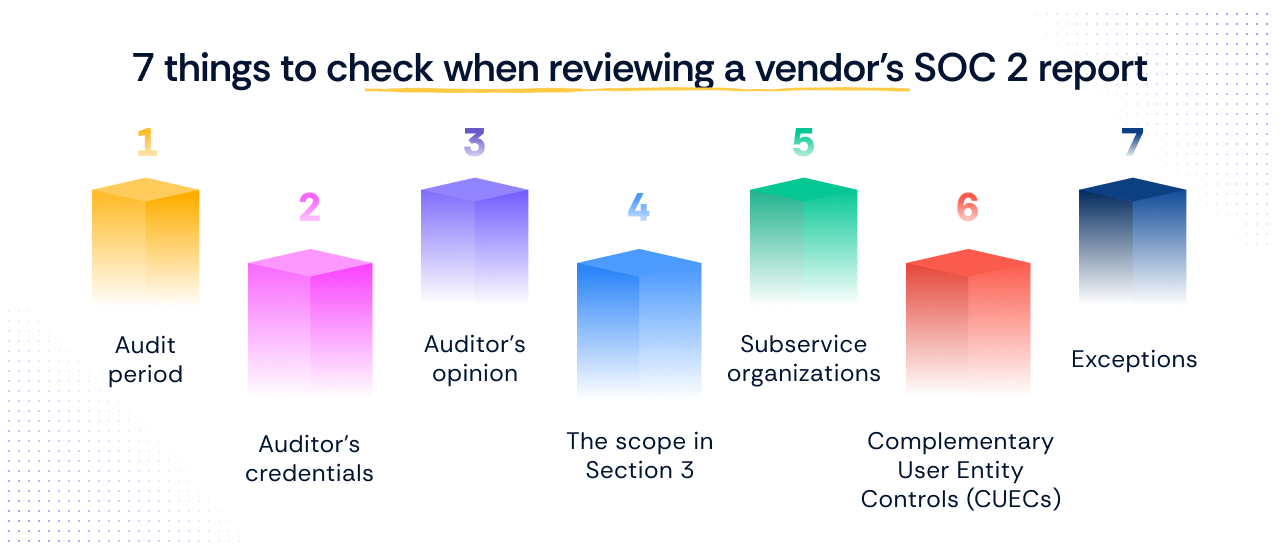
When a vendor’s report lands on your desk, you rarely have more than half an hour before someone needs an answer. Here is a practitioner’s checklist for spending that time where it matters.
1. Check the audit period first. Is the report stale? Most enterprise buyers treat anything older than 12 months as insufficient. If there is a gap between the coverage period and today, request a bridge letter.
2. Check the auditor’s credentials. Confirm the CPA firm is enrolled in the AICPA peer review program, and check the peer review status (pass, fail, or conditional) on the AICPA website. A CPA firm not enrolled in the peer review program cannot issue a valid SOC 2 attestation engagement.
3. Read the auditor’s opinion before anything else. The opinion is where qualifications appear. A document with only a management assertion and no CPA opinion is not a SOC 2 report.
4. Check the scope in Section 3. What systems, services, and locations are covered? If your vendor uses both AWS and Azure, but only AWS is in scope, you have no assurance on the Azure environment.
5. Check subservice organizations. Which cloud providers or third-party processors does the vendor rely on, and are their controls carved out or included? A carve-out means those controls were not tested here.
6. Check Complementary User Entity Controls (CUECs). These are controls that the vendor expects your organization to implement. With AWS, for example, the vendor may assume you enforce named users and MFA on your own IAM. If you are not doing them, your end-to-end assurance has gaps.
7. Review exceptions, not just the opinion. An exception on a single control is not a qualification. A qualification only appears when all controls within a criterion have exceptions. Exceptions are where the real risk hides.
For a longer walkthrough, see our step-by-step guide to reviewing a vendor's SOC 2 report.
SOC 2 report vs. SOC 1 vs. SOC 3: Which one do you need?
Three SOC reports get confused constantly. Here is how to tell them apart.
SOC 1 covers internal controls that could affect a customer’s financial reporting. It is the right report for payroll processors, payment companies, and claims handlers, where a control failure could distort a client’s books. In Kush Kaushik’s experience, only 4 to 5 out of every 100 organizations pursuing a SOC report opt for SOC 1. It is not the right report for most SaaS companies.
SOC 2 is what enterprise buyers mean when they ask for “your SOC 2”: information security controls across one or more of the five Trust Services Criteria. If you are a SaaS company, cloud service, managed service provider, data center, or HR platform, this is your report.
SOC 3 is what you get when you want to put your compliance posture on a website without handing over a 70-page report. Think of it as “SOC 2 lite”: it states that controls exist without naming the specific firewall, antivirus, or cloud provider, so you can post it on a website without an NDA.
It cannot be issued independently; it derives from an existing SOC 2 Type 2, and a Type 1 will not do. It also cannot be issued if the underlying SOC 2 has a qualified opinion. Only a small share of organizations obtain one, around 5% in Kush Kaushik’s estimate, but it is a genuine asset for SaaS companies in self-serve or low-touch sales motions where you never meet the customer.
SOC 1 vs. SOC 2 vs. SOC 3 comparison
If you are weighing SOC 2 against other frameworks, it helps to understand how SOC 2 overlaps with ISO 27001 and GDPR.
How long is a SOC 2 report valid for?
A SOC 2 report has no formal expiry date set by the AICPA. In practice, the market standard is 12 months. Most enterprise buyers treat a report older than 12 months as stale.
When there is a gap between the observation period end date and today, a bridge letter covers it: a management statement that controls have not materially changed since the audit closed. It is not an audit. It is the service organization’s own assertion, used to span the window until a fresh report is ready.
Annual reassessment is the industry standard for Type 2. Once you complete your first Type 2, you stay on Type 2, and the observation periods should be continuous. Letting the period lapse creates a gap in your audit continuity that a careful buyer will notice.
For teams looking to keep that cycle tight, see our guidance on accelerating your SOC 2 audit cycle.
How is a SOC 2 report structured? The full example breakdown
The sections above explain what each part of a SOC 2 report does. The following breakdown shows how they appear in a real Type 2 report covering Security, Confidentiality, and Availability, the three criteria most SaaS companies include.
1. Independent service auditor’s opinion
The auditor examines the company’s system description against the AICPA’s Description Criteria, evaluates whether the system was suitably designed, and, for a Type 2, whether controls operated effectively across the period.
The opinion states whether the description is fairly presented and whether controls met the applicable Trust Services Criteria. It notes that the examination does not cover the controls of subservice organizations, such as data center providers, and it marks the report as restricted-use.
2. Management assertion
Management provides its own description of the system for the period and confirms, in writing, that the description is fair and that controls were suitably designed to meet the criteria, assuming subservice and user-entity controls operate effectively. This assertion is the company’s declaration. The auditor’s opinion is what gives it weight.
3. System description
This is the longest narrative section, and it is usually the organization that hands it to the auditor first. It covers the background and services, any significant changes during the period, subservice organizations, principal service commitments, and the components of the system: infrastructure, software, people, procedures, and data.
It defines the boundaries of the audit, including which products and cloud environments are in scope and what is explicitly excluded, such as physical offices where all processing happens in the cloud. It also documents the control environment, risk assessment process, monitoring, and the CUECs that customers are expected to implement.
4. Description of Trust Criteria service controls and test results
This section documents each control, the auditor’s test procedure, and the result. It spans the Control Environment, Risk Assessment, Monitoring Activities, Control Activities, and Logical Access Controls under Security, then System Operations, Change Management, and Risk Mitigation, followed by the Availability-specific controls for uptime, capacity, backups, and BCDR testing, and the Confidentiality-specific controls for data retention, disposal, and secure deletion.
Each control area records whether exceptions were noted during testing.
5. Other information: Management’s response (optional)
This optional section holds additional context from the company, often about disaster recovery and business continuity practices. Nothing here is audited. The auditor has not verified these details, so read this section as management’s commentary rather than as assurance.
For help determining what belongs in Section 3, see our guide to defining your SOC 2 scope.
How Scrut helps
Scrut automates control monitoring, evidence collection, and audit workflows so SOC 2 runs as an ongoing operation rather than a quarterly fire drill. Evidence is collected and time-stamped as controls run, which means your posture is visible to your team and your auditor throughout the period, not just at report time.
Explore Scrut's SOC 2 compliance platform and see how automated evidence collection fits your audit cycle.
FAQs
Is the SOC 2 Type 2 report different from the SOC 2 Type 1 report?
Yes. A SOC 2 Type 1 report focuses on the design of controls at a specific point in time, whereas a SOC 2 Type 2 report focuses on the operating effectiveness of controls throughout the audit period. Most enterprise buyers, financial institutions, and regulated-industry customers require Type 2. Type 1 is generally acceptable as an interim step early in a sales cycle.
What are the requirements for the SOC 2 Type 2 report?
To meet SOC 2 Type 2 requirements, your organization must address the Security criterion, which is mandatory. You may also include other Trust Services Criteria, such as availability, processing integrity, confidentiality, and privacy, based on the services you provide and the commitments you make to users.
Is SOC 2 system description a critical part of a SOC 2 Type 2 report?
Yes, the system description is essential. It outlines the scope, control framework, and systems in place to meet SOC 2 requirements, providing context for the audit. The system description also defines what is not covered. If a system your customer relies on is out of scope, the report provides no assurance on it.
How does a SOC 2 Type 2 report help in understanding when a bridge letter is required?
A SOC 2 Type 2 report details the period of coverage and any gap between the end of that period and the present. That gap indicates the need for a bridge letter, which provides assurance that controls have remained in place and have not materially changed since the last audit period.
What is the important documentation included in a SOC 2 Type 2 report?
The important documentation includes the independent service auditor's opinion, the management assertion, the system description, the description of Trust Criteria service controls and test results, and the optional other information section.
Who needs a SOC 2 report?
The short answer: if an enterprise buyer is asking for it, you need it. That means any service organization storing, processing, or transmitting customer data on behalf of clients, including SaaS companies, cloud infrastructure providers, managed service providers, data centers, HR and payroll platforms, and healthcare technology companies. SOC 2 is not legally required, but it is functionally required for selling to enterprise buyers, financial institutions, and government procurement.
How long is a SOC 2 report valid for?
Twelve months is the practical market standard, even though the AICPA sets no formal expiry. Most enterprise buyers treat anything older as stale. If there is a gap between the observation period end date and the current date, a bridge letter can assert that controls have not materially changed.
What is the difference between a SOC 1 and a SOC 2 report?
SOC 1 is for organizations whose control failures could distort a client's financial books: payroll processors, payment companies, claims handlers. If that does not describe your business, you almost certainly need a SOC 2, not a SOC 1. SOC 2 covers information security controls across one or more of the five Trust Services Criteria.
What is a SOC 2 Type 1 report?
A SOC 2 Type 1 report is an attestation that a service organization's security controls are suitably designed as of a specific date. It does not test whether controls operated effectively over time. Type 1 is faster and less expensive than Type 2, and is often used as a first step while an organization builds toward a Type 2 audit. It is issued by an AICPA-licensed CPA firm.
Can a SOC 2 report contain exceptions or qualified opinions?
Yes, and the distinction matters. An exception means one control did not operate as intended during the period. A qualification is a different category: it appears in the auditor's opinion only when every control within a criterion has exceptions, not just one. You can hold a useful SOC 2 with noted exceptions, which is exactly why you read them rather than stopping at the opinion.

%201.png)


.webp)