


%20(1).png)
AI is everywhere. Governance should be, too.
Discover AI apps and builders, understand who is using them, and manage or restrict access from one connected workflow.



Your AI policy only works for the AI you know about.
AI tools and builders can enter the organization before review, creating gaps in visibility, access control, and policy enforcement.
AI apps and builders can enter the organization before security, IT, or GRC teams review them.
AI apps may handle sensitive data, while builders can connect to codebases, APIs, and technical environments.
A restricted status does not confirm that access has been removed or usage has stopped.


One workflow to discover, review, and continuously govern
Scrut brings AI application discovery, review, remediation, and continuous governance into a single workflow.
Discover applications across supported identity and device sources, including SSO integrations such as Google Workspace and Microsoft Entra, as well as desktop discovery through supported device-management integrations or the Scrut Agent.
Applications are surfaced as SaaS or desktop applications, giving your teams one centralized place to review what is actually being used.

Scrut automatically identifies discovered tools as AI Apps or AI Builders, giving your teams the context they need to conduct the right review.
AI Apps may include tools such as Perplexity, Notion AI, and Grammarly.
AI Builders may interact with codebases, APIs, or development environments, including tools such as Cursor and Lovable.
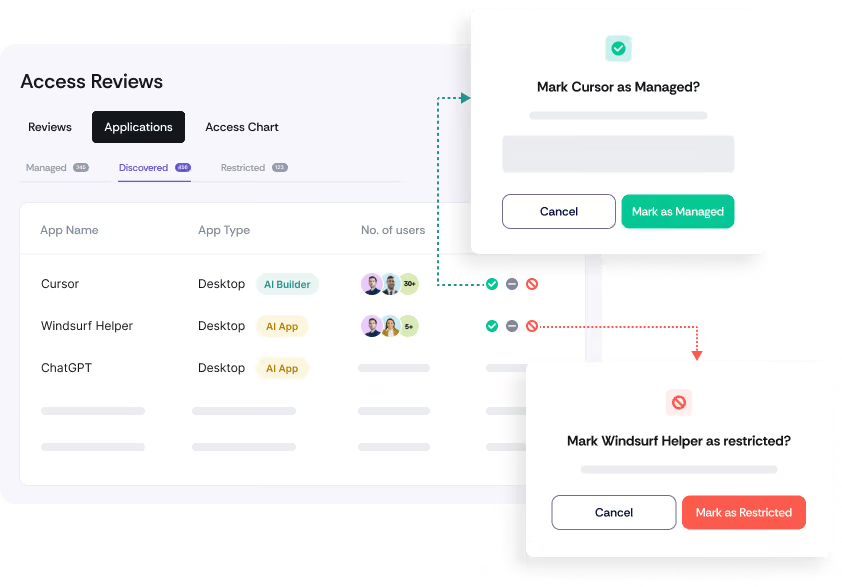
Review discovered applications and move them into the appropriate governance state:
Managed: Approved for organizational use.
Ignored: Reviewed and excluded from further action.
Restricted: Determined to be unsuitable for organizational use.
When restricting an application, teams can document the reason for the decision and identify the employees associated with its usage.
Notify affected employees directly from the workflow and provide clear instructions to remove access.
For applications discovered through SSO, users can be guided to revoke third-party application access. For desktop applications, users can receive instructions to uninstall the application.
Scrut continuously checks whether discovered AI applications have been reviewed and whether restricted applications remain in use.
Close the gap between creating an AI policy and proving that it is being followed.
Move from AI visibility to continuous governance.
Bring discovered AI apps and builders into one place for security, IT, and GRC teams to review.
Understand how each application is being used before deciding whether it should be managed, ignored, or restricted.
Turn policy decisions into employee-level remediation instead of leaving restrictions documented but unenforced.
Monitor whether applications have been reviewed and whether restricted tools continue to appear in your environment.
Frequently Asked Questions
Shadow AI is the use of AI-powered applications and development tools that have not been formally reviewed by your organization. These tools can enter the environment before Security, IT, or GRC teams have assessed how they are being used or the risk they introduce.
Scrut discovers applications through connected identity and device sources, including supported SSO integrations such as Google Workspace and Microsoft Entra, and supported device-management sources. Discovered tools are surfaced within People → Access Reviews → Applications.
The application appears in the Discovered tab for review. Teams can then mark it as Managed if it is approved, Restricted if it should not be used, or Ignored if it does not require further action.
Yes. A reviewer can be assigned to manage SaaS applications. That reviewer is then preselected when the application is included in an Access Review, helping establish clear ownership for ongoing access governance.
Teams can record the reason for the restriction, identify affected employees, and send them removal instructions directly from Scrut. The instructions are tailored to the application's source, such as revoking SSO access or uninstalling a desktop application.
Scrut runs automated tests to identify AI applications that still require review and to check whether restricted applications remain in use. When no AI applications remain unreviewed in the Discovered state, the corresponding Shadow AI test passes
Shadow IT refers broadly to applications adopted outside approved IT processes. Shadow AI is the AI-specific subset, where applications may interact with company data, code, APIs, or development environments and require additional review.
Scrut identifies discovered AI tools as AI Apps or AI Builders, so teams can isolate AI-powered applications from the broader application list and review them with the right context.
Yes. Scrut supports bulk actions for discovered applications, allowing teams to mark multiple applications as Managed, Restricted, or Ignored without reviewing them one at a time.
Yes. Supported SaaS applications across the Managed, Discovered, and Restricted states can be included in Access Reviews. Completing an Access Review for a Discovered or Restricted SaaS application moves it into the Managed state. Desktop applications are currently excluded from Access Review scope.
No. Marking an application as Restricted records the governance decision and enables teams to notify users and monitor continued usage. Scrut does not automatically block the application or revoke access.
Bring Shadow AI into the light.