


%20(1).png)


- Review high and critical risks monthly, run a full review quarterly, and update immediately after major events.
- Every entry moves through four lifecycle stages: identification, assessment, response, and monitoring.
- A complete entry usually contains 10 to 12 standard fields, from risk ID and description through inherent score, response, owner, and residual risk.
- A risk register is a structured document that records every identified risk with its likelihood, impact, owner, treatment plan, and status, giving teams one source of truth for risk decisions.
- The most common failure mode: built for an audit, never opened again.
A risk register is a structured tool for identifying, assessing, monitoring, and managing risks across business operations, including security and compliance. By documenting potential threats, assigning ownership, and defining treatment strategies, it turns scattered concerns into tracked, owned decisions.
Frameworks like ISO 31000, NIST SP 800-30, and COSO ERM provide best practices for building and running one. This guide covers what a risk register is, how to create one step by step, and how to keep it useful long after the audit that prompted it.
What is a risk register?
A risk register is a structured document that records every identified risk alongside its likelihood, impact, owner, treatment plan, and current status, giving teams a single source of truth for risk decisions.
The purpose of a risk register is to make risk visible, owned, and actionable, so that threats are documented and treated before they become incidents. It is not a passive inventory. A register earns its keep by forcing a decision on every entry: who owns this, how bad is it, and what are we doing about it.
The concept is grounded in established standards. NIST IR 8286 defines a notional cybersecurity risk register and shows how it feeds enterprise risk management. The Project Management Institute’s PMBOK Guide defines the risk register as the document where risk analysis and response planning results are recorded. ISO 31000 and NIST SP 800-30 provide the assessment methodology that populates it.
There is a practitioner distinction worth holding onto here. What you put in the register and how it got there matter more than how complete it looks. A register that catches the risks with the greatest impact on your business is far more valuable than one padded with entries that were simply easy to define. Sound risk management is about identifying what actually threatens the company, not populating a template.
What is a risk register used for?
Risk registers do three things that matter operationally: they force prioritization, assign accountability, and create the documented trail that frameworks like SOC 2, ISO 27001, and the NIST Cybersecurity Framework require. Risks that are documented and owned get treated before they become incidents. Risks that live in someone's head do not.
Common applications by industry:
- IT and cybersecurity: Tracking data breaches, ransomware, and insider threats while supporting SOC 2, GDPR, and HIPAA compliance.
- Financial services: Managing fraud, money laundering, and regulatory exposure under SOX, PCI DSS, and Basel III.
- Healthcare and pharma: Protecting patient data privacy and meeting HIPAA and FDA obligations.
- Construction and engineering: Documenting safety hazards and OSHA compliance risks.
- Corporate enterprises: Tracking financial, operational, and supply chain risks for business continuity.
What does a risk register include? (10–12 standard fields)
A complete risk register entry contains 10 to 12 fields. Ten are the working minimum; most mature registers add risk priority and a review date, for 12 in total. The table below is the quick reference, and the steps that follow explain how to fill in each field.
Components of a risk register
How to create a risk register: 12 steps across the risk lifecycle
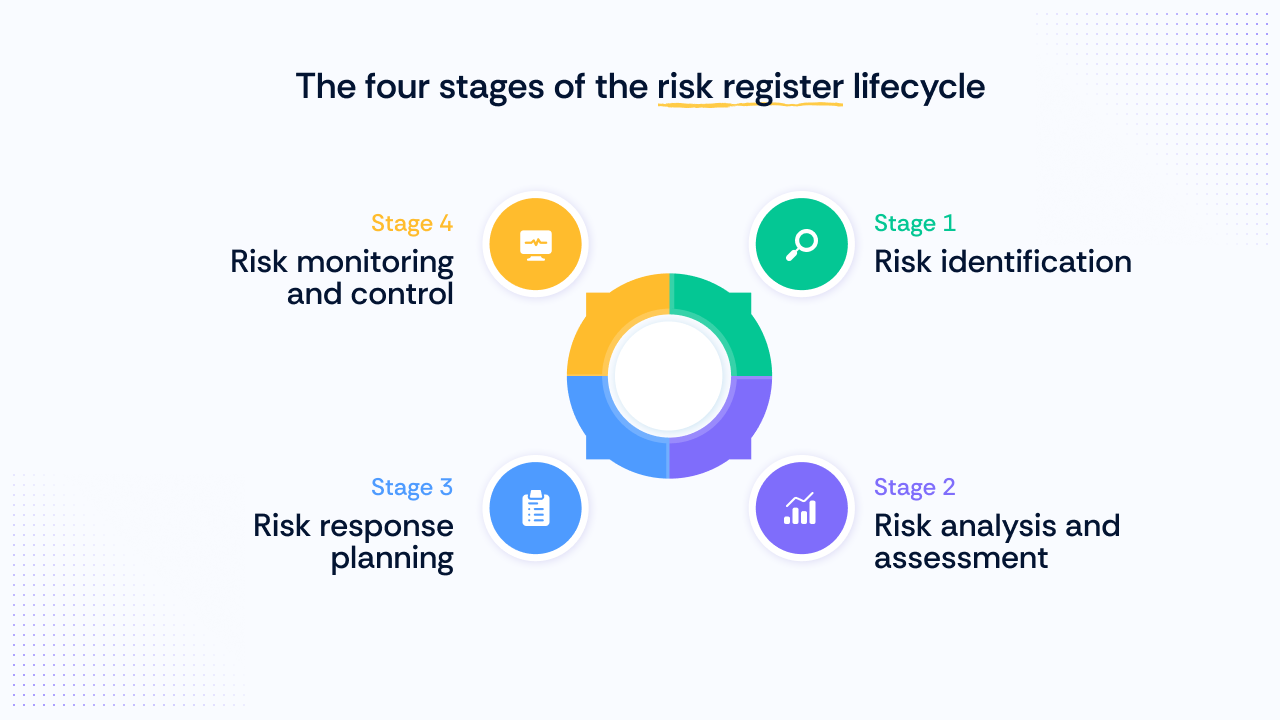
Every risk register entry moves through four lifecycle stages: identification, assessment, response, and monitoring. The 12 steps below are grouped by stage and aligned with the NIST Cybersecurity Framework and NIST IR 8286, so your register holds up in audits and board reporting.
Stage 1: Risk identification
Identify potential risks by analyzing internal and external factors, systems, and processes. Use risk assessments, threat modeling, configuration reviews, and historical incident data. Most teams end up tracking a recognizable set of classes: systemic risks in their environment, application risks, business risks, and supply chain risks. An unpatched VPN appliance is a systemic risk; a third-party vendor with production access is a supply chain risk.
Identification works best as a cross-functional exercise. A single security team's perspective misses operational and strategic risks that only surface when you bring in finance, engineering, legal, and business leadership. Practitioners are blunt about this: the minimum viable risk assessment is getting the right people together. Without speaking to business leaders and understanding their priorities, you miss risks that may be critical to the company.
The trap to avoid is populating the register with what is easy to define rather than what carries the greatest impact.
1. Create a risk identifier. Assign each risk a unique ID (for example, R-014) so it can be tracked across reports and reviews.
2. Write a risk description. State what could happen, how it could occur, the trigger, and the contributing factors. Vague entries like “cyber risk” cannot be consistently scored or assigned. Keep it specific: “Unpatched internet-facing VPN appliance enables ransomware deployment” beats “ransomware risk.”
3. Categorize the risk. Group risks by type (operational, financial, compliance, strategic, reputational, or third-party) or by department. The goal is that ownership is obvious from the category alone, without anyone having to ask.
Stage 2: Risk analysis and assessment
Evaluate each risk by likelihood and impact. Qualitative methods (risk matrices) work for most organizations; quantitative methods (Monte Carlo simulation, annualized loss expectancy) suit mature programs. COSO's ERM framework emphasizes integrating these assessments into business strategy, not running them as a side exercise.
Two terms in this stage get conflated often enough to cause real problems in audits. Inherent risk is the raw exposure before any controls exist. Residual risk is what remains after controls are applied. A complete register records both, because inherent risk sets the baseline, and residual risk shows whether your controls are actually pulling exposure down toward acceptable tolerance.
Consistent risk scoring across both is what lets you compare entries and defend the register to an auditor. It also connects to risk appetite: residual risk is the number that leadership actually decides to accept or escalate.
4. Estimate likelihood. Rate the probability that the risk occurs on a defined scale: 1 (rare) to 5 (almost certain) is standard. The scale matters less than applying it consistently. A 3 at one review should mean the same thing as a 3 at the next.
5. Determine impact. Rate the consequence if the risk materializes in business terms: revenue loss, downtime, regulatory fines. Avoid rating in technical terms. An auditor or board member reading the entry should not need a translation.
6. Measure inherent risk. Multiply likelihood by impact before any controls are applied. On two 1–5 scales, this produces a score from 1 to 25. This is your raw exposure.
7. Set risk priority. Translate the inherent score into a severity band (critical, high, medium, or low) so the most serious exposures get resources first. Define the score range for each band once, document it in your methodology, and apply it to every entry.
Stage 3: Risk response planning
Document how each risk will be treated. Responses range from new security controls and employee training to insurance and contract clauses. The SOC 2 Trust Services Criteria and NIST SP 800-39 both expect risk treatment decisions to be documented as part of the broader risk management process.
8. Define the risk response. Choose to mitigate, transfer, accept, or avoid, consistent with NIST guidance, and link the response to organizational goals. A documented risk treatment plan keeps the decision auditable.
9. Assign risk owners. Name a specific person or team accountable for monitoring and treating each risk. Unowned risks are untreated risks. Ambiguous ownership is where registers quietly fail: when nobody is clearly accountable, people play a game of musical chairs, each insisting the risk belongs to “the business” or to someone else. Name the owner explicitly at creation time so the finger-pointing never starts.
10. Implement risk treatment. Execute the planned response through preventive controls, contingency plans, or transfer arrangements such as insurance. Tie each treatment to the specific risk it addresses, and use a structured risk assessment after implementation to confirm the exposure has actually dropped.
Stage 4: Risk monitoring and control
Risk management is continuous. Controls have to be monitored, emerging risks captured, and treatment effectiveness re-evaluated on a defined cadence, not whenever someone remembers. Good continuous monitoring looks like automated tracking that surfaces drift and control failures as they happen, rather than a spreadsheet someone reopens once a year. Static spreadsheets also lack version history, so incorrect entries can go unnoticed until an audit.
11. Track status and set the review date. Mark each risk as active, in treatment, accepted, or closed. Set the review date at creation time, not later. A register with no defined review rhythm drifts out of date and becomes a red flag rather than an asset.
12. Record residual risk. Once controls are in place and verified, document the risk that remains. No control eliminates risk entirely, and auditors expect to see this acknowledged.
Risk register example entry
How often should a risk register be updated?
A risk register is only useful if it stays current. In Scrut’s experience working with compliance teams across SaaS, fintech, and healthcare, the registers that fail are the ones built for an audit and never opened again. A practical maintenance cadence:
- Monthly: Review high and critical risks; update statuses and treatment progress.
- Quarterly: Full register review; re-score risks, retire closed items, and add emerging threats.
- Event-driven: Update immediately after incidents, major vendor changes, new regulations, or significant infrastructure changes.
- Annually: Validate the scoring methodology and risk appetite with leadership.
“Event-driven” is the part most teams underestimate. Without a written list of triggers, out-of-cycle updates simply do not happen, and the register drifts until the next audit forces a scramble.
The right frequency depends on how fast your business actually changes. A register updated every day is not automatically better than one updated quarterly, if the processes, technologies, and people behind those risks are not changing that often. Tie the cadence to the pace of business change, not the audit cycle.
At a minimum, make time once a year for a top-to-bottom review. The quarterly check-in costs almost nothing and catches drift before it compounds. Tools that support continuous risk management make this cadence far easier to sustain.
There is also a size discipline worth enforcing. According to Nicholas Muy, CISO and VP of Engineering - Platform & Security, at Scrut Automation, a register with 200-plus entries is too large to be operationally useful, even for a large public company. Kept strategic, it stays closer to under a hundred entries. Registers bloat when people try to use them as a secret escalation path, forcing a vulnerability or a pet project onto the list to get attention or resources.
When everything is a strategic risk, nothing is. The register should only be as big as you are willing to care about it, and risk management automation helps keep triage honest.
Is a risk register the same as a risk report?
No. Think of the register as the database and the report as the snapshot pulled from it for a specific audience. The issue log is a different artifact entirely: it tracks problems that have already occurred, not potential future events.
What are the benefits of a risk register?
A register built once and abandoned delivers a fraction of the value of one that is scored, reviewed, and acted on. The benefits compound only when maintenance is real. The most prominent:
- Risk visibility: One centralized view of all identified threats.
- Proactive management: A risk that is documented, scored, and assigned to an owner gets treated. One that lives in someone's head or a Slack thread does not.
- Prioritization: Not every risk deserves the same attention. Severity-based ranking makes that explicit, so the team is not spending equal time on a medium-likelihood vendor issue and a critical infrastructure exposure.
- Informed decisions: Leadership allocates budget against evidence, not instinct.
- Compliance and audit readiness: Documented, monitored risks help organizations meet SOC 2, ISO 27001, and NIST expectations and support broader compliance and audit readiness.
- Accountability: Named owners mean every risk has someone responsible for it.
- Communication: Teams, stakeholders, and auditors work from a shared, current record.
- Board and executive communication: A well-maintained register lets you frame risk in terms the board understands, revenue impact, downtime, and fines, rather than vulnerability counts. Strong risk communication is often what turns a register from a compliance artifact into a decision-making tool.
How does a risk register relate to a risk control matrix?
Your risk register identifies what could go wrong. A risk control matrix (RCM) maps the controls that treat each entry, showing coverage at a glance and making gaps visible before an auditor finds them. The register scores and prioritizes risks; the RCM connects those risks to the specific controls meant to reduce them. They are complementary, not interchangeable.
The failure mode is worth naming. People are consistently better at making documents than at implementing processes. A well-informed understanding of your risks, translated into even a simple RCM but operationalized well, protects you more than a complex, elegant matrix that nobody actually runs. When evaluating an RCM, the real question is not how detailed it looks but whether the controls it maps are genuinely implemented and monitored.
What does a risk register look like at different company sizes?
Implementation scales with headcount, risk profile, and organizational structure. The underlying lifecycle stays the same, but what the register looks like in practice varies widely.
Early-stage (typically under 100 employees). A register often starts as a structured spreadsheet with 10 to 20 entries covering systemic, application, and supply chain risks. The goal is coverage of the risks leadership would want to see, not exhaustiveness.
Many teams begin from a template with four or five risk categories, copy it, and adapt from there. The minimum viable version is straightforward: get the right people in the room. If the information quality is good, the process follows.
Mid-market (typically 100 to 500 employees). The CISO office usually owns the register, maintains it in a dedicated tool, and reviews it at board and leadership cadences. Teams commonly import existing risk data from spreadsheets at this stage.
The register should be governed by a clear SOP: what goes in, who owns it, when it is reviewed, and how closure is documented. A defined GRC implementation approach keeps that governance consistent as the team grows.
Enterprise. Risk management spans IT, operational, financial, and strategic domains. In practice, the register stays fragmented by domain, each rolling up under a different owner and charter. That is fine. Different risk types answer to different leaders, and the fragmentation reflects organizational structure rather than a program failure.
Unifying everything into one register is a common aspiration that rarely holds, and mature IT risk management accommodates that reality instead of fighting it.
Manage your risk register with Scrut
Scrut helps you build, track, and automate your risk register with ease, ensuring effective risk management across your organization.
- Build your risk register: Use Scrut’s risk register feature with pre-mapped risks or create custom risks, assign owners, and track status in a centralized repository.
- Flag and score your risk: Leverage Scrut’s automated risk scoring to assess your information system risks and maintain an up-to-date tracker.
- Develop your risk treatment plan: Choose to accept, mitigate, transfer, or avoid risks, and document the decision in a format that auditors and leadership can actually use.
- Automate your risk assessment: Scrut’s intelligent risk register tools support continuous monitoring of your risk log, helping you stay compliant and proactively manage threats.
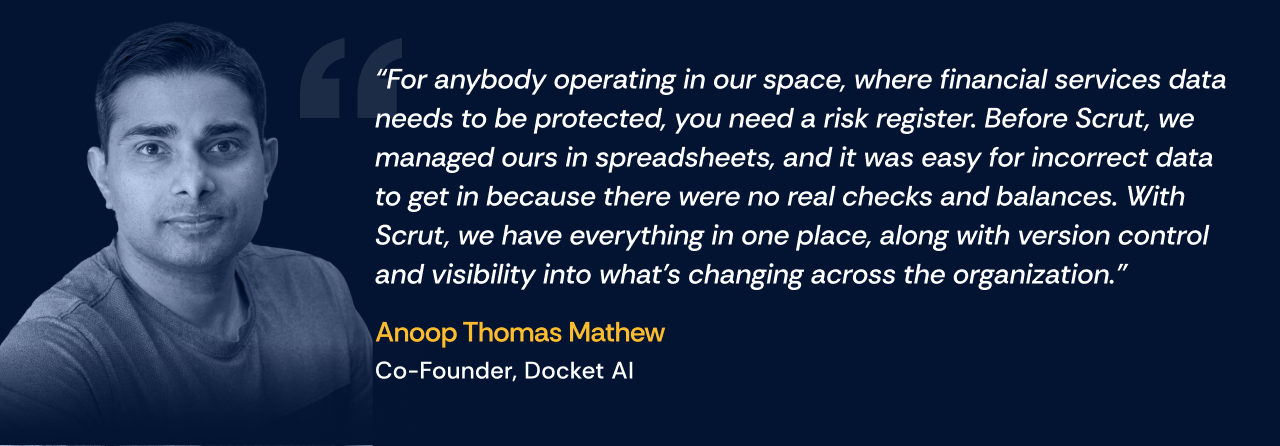
Practitioners who have made the move off spreadsheets describe the difference plainly:
To see how Scrut can help you maintain an audit-ready register, book a demo with us.
In project management, a risk register documents every risk that could affect project objectives, with its probability, impact, owner, and response plan. PMI's PMBOK Guide treats it as a core output of risk planning, created at kickoff and updated throughout the project lifecycle.
A cybersecurity risk register tracks threats to information systems, such as breaches, ransomware, and insider misuse, scored by likelihood and impact. NIST IR 8286 defines the standard structure and shows how cyber risk registers roll up into enterprise risk management.
At minimum: risk ID, description, category, likelihood, impact, inherent risk score, response strategy, owner, status, and residual risk. Mature registers also record review dates and links to mitigating controls.
The purpose is to make every identified risk visible, owned, and actionable, so that threats are documented, scored, assigned to an accountable owner, and treated before they escalate into incidents. A well-maintained register also supports compliance with frameworks such as SOC 2, ISO 27001, and NIST, and gives leadership the evidence needed to make resource allocation decisions.
Yes. A single risk register can support SOC 2, ISO 27001, NIST, HIPAA, and other frameworks at once because the underlying risk lifecycle, identify, assess, respond, monitor, is consistent across them. The controls and specific scoring criteria may differ by framework, but the register's core structure does not need to change. GRC platforms that map controls across multiple compliance frameworks let one risk entry satisfy requirements in several frameworks simultaneously.


%201.png)