

%20(1).png)


- Defines what reliable evidence actually requires across the six properties auditors evaluate, and where automation can and cannot deliver them
- Breaks down how automated evidence collection works across three layers: data collection, mapping, and validation, and what genuine automation looks like at each
- Walks through the seven steps a control must travel before it becomes audit-ready evidence, with failure modes at each step
- Covers evidence integrity as a distinct risk from collection: what happens to an artifact after it is collected, and how to know if it is still trustworthy by the time an auditor sees it
- Gives you a six-metric self-diagnostic you can run on your own program this week to identify where your evidence operation is exposed before an auditor finds it first
If you have run a compliance program of any meaningful scale, you already know the uncomfortable part of evidence collection that nobody on a vendor call will say out loud. A significant portion of what is marketed as automated evidence collection, under closer inspection, turns out to be organized storage.
A platform pulls a screenshot from a Google Drive folder where a control owner uploaded it last quarter. It maps that screenshot to a control ID. It puts a green checkmark on a dashboard. From a distance, this looks like automation. But when the auditor asks how the evidence was generated and on what date and against what population, it is the same manual process you have always run, with a nicer interface bolted on top.
According to the Thomson Reuters Institute's 2025 C-Suite Survey, time-consuming compliance and reporting tasks were cited as a moderate or significant constraint by 68% of leaders, making it the most widely felt drag on organizational performance.
That pressure is exactly what automated compliance software promises to solve. And it has, in part. But the way that promise gets communicated often outpaces what the technology actually delivers, particularly around evidence collection.
This blog examines the question of control-by-control: where security compliance automation genuinely works and where it does not.
What automated evidence collection actually means
Automated evidence collection operates across three distinct layers. The level of genuine automation varies significantly across them, and most vendor demonstrations show only one.
1. Data collection: Where the most complete automation exists
This is the layer where most platforms excel. Data collection refers to pulling raw information directly from source systems through API integrations: cloud environments, identity providers, developer tools, and ticketing systems. No human needs to export a report or remember to run a query.
Three things vendor demos do not show you:
- Cadence is almost never continuous in the literal sense. Most platforms poll APIs every 24 hours. When a platform says "continuous monitoring," what they almost always mean is daily. For most controls, this is fine. For change management or privileged access, it is not. A 23-hour gap between a privileged access change and the next collection cycle is exactly the kind of window an auditor will ask about.
- The integration is only as good as the scope it was set up with. If your AWS integration was scoped to a single account but your production environment spans seven, the platform is collecting from one-seventh of your environment and reporting it as complete. This is a setup decision that almost no compliance team revisits after onboarding. Auditors will.
- Integrations break silently. A token expires. An API permission is revoked during a routine IAM cleanup. The platform stops receiving valid data, but the dashboard stays green. The first sign of trouble is an auditor asking why no evidence exists for a four-week period. This is the single most common reason for evidence gaps in mature programs.
2. Evidence mapping: Partial automation, with gaps
Evidence mapping translates raw data into artifacts tied to specific control requirements. Automation exists here, but it is partial. Pre-built mappings link data fields to control IDs across common frameworks without human intervention. The gaps appear when your environment does not match the assumptions those mappings were built on.
A report showing MFA status across all users may look correctly mapped, but fail the control if the requirement applies only to privileged accounts. Mapping overstates compliance when it includes out-of-scope populations and understates it when it excludes in-scope ones. Either way, the reconciliation is on you.
Scrut Teammates’ Policy-Control Mapping feature addresses this by analyzing policy documents and recommending accurate mappings, including for custom controls, with a review step that lets teams accept, reject, or adjust before finalizing.
3. Validation: Automated checks exist, but there is no automated judgment
Validation answers one question: Does this evidence actually satisfy the control requirement as an auditor would evaluate it? Automated validation means running predefined checks to surface specific failure conditions: a user list that excludes service accounts, a report pulled outside the audit period, or an access record that does not reconcile with an offboarding event.
For manual evidence, Scrut Teammates' Evidence Checker reviews uploaded artifacts for gaps and suggests improvements before fieldwork begins, a particularly valuable step for point-in-time controls where sufficiency is often assumed rather than verified.
Where automation reaches its limit is judgment. Whether an exception was legitimate, whether the access carried real risk, whether the auditor's sufficiency standard has been met: those decisions require a human.
Most compliance teams invest heavily in defining controls and collecting evidence, but underestimate what happens at the validation layer. It is the step most teams discover is missing only when an auditor asks a question that the platform cannot answer.
Four ways validation breaks in practice

One common mistake among startups is neglecting to maintain compliance post-certification
Real validation looks like rules, runs continuously, and flags specific failure conditions. If you have been through a compliance audit with automated compliance software in place, you have likely seen at least one of these play out.
Data collected but never mapped to controls:
Getting an integration live feels like progress, and it is, but collection and mapping are two separate problems.
- Data flowing into a platform without being tied to a specific control requirement is not evidence. It is storage.
- An auditor does not evaluate whether your platform is receiving data. They evaluate whether the data you present satisfies the control it is supposed to cover.
- A gap between what is being collected and what is being mapped means evidence appears to exist in the platform while being entirely unusable in an audit context.
Integrations that break silently:
API-based integrations are not a set-and-forget infrastructure.
- Any number of routine system changes can stop an integration from pulling valid data, and most platforms are not purpose-built to distinguish between a successful collection run and a silently failed one.
- The compliance dashboard reflects the last known state, not the current one.
- The gap only becomes visible when an auditor asks for evidence covering a period where none was actually collected.
Evidence that was never validated:
Mapping a data artifact to a control ID and marking it complete are not the same as confirming the artifact satisfies the control.
- A report can be attached to the right control in the right framework and still fail audit if it covers the wrong user population, excludes accounts that fall within scope, or was pulled outside the relevant audit period.
- The platform has done its job by the narrow definition. The evidence has not done its job by the standard an auditor applies.
Automation that is a manual upload in disguise:
Not all evidence that appears in a compliance platform was generated by an integration.
- In many programs, a meaningful share of what gets marked as evidenced was uploaded manually by a control owner rather than pulled from a source system.
- The platform organized it and mapped it to a control, which has real value. But the underlying collection process was manual, which means the evidence carries the same provenance problems as anything compiled outside the platform: no timestamp tied to the source system, no way to verify currency, and no audit trail showing how it was generated.

What makes evidence reliable
Automated or not, all compliance evidence is evaluated against the same standard. These are the six properties auditors check, and the ones most teams discover are missing only during fieldwork.
No platform fully automates all six. Traceability, currency, and completeness are largely automatable with well-configured integrations. Scope accuracy, sufficiency, and provenance require human decisions at specific points in the chain.
A program that treats all six as solved by automation is the one most likely to produce evidence that looks complete on a dashboard and fails in fieldwork.
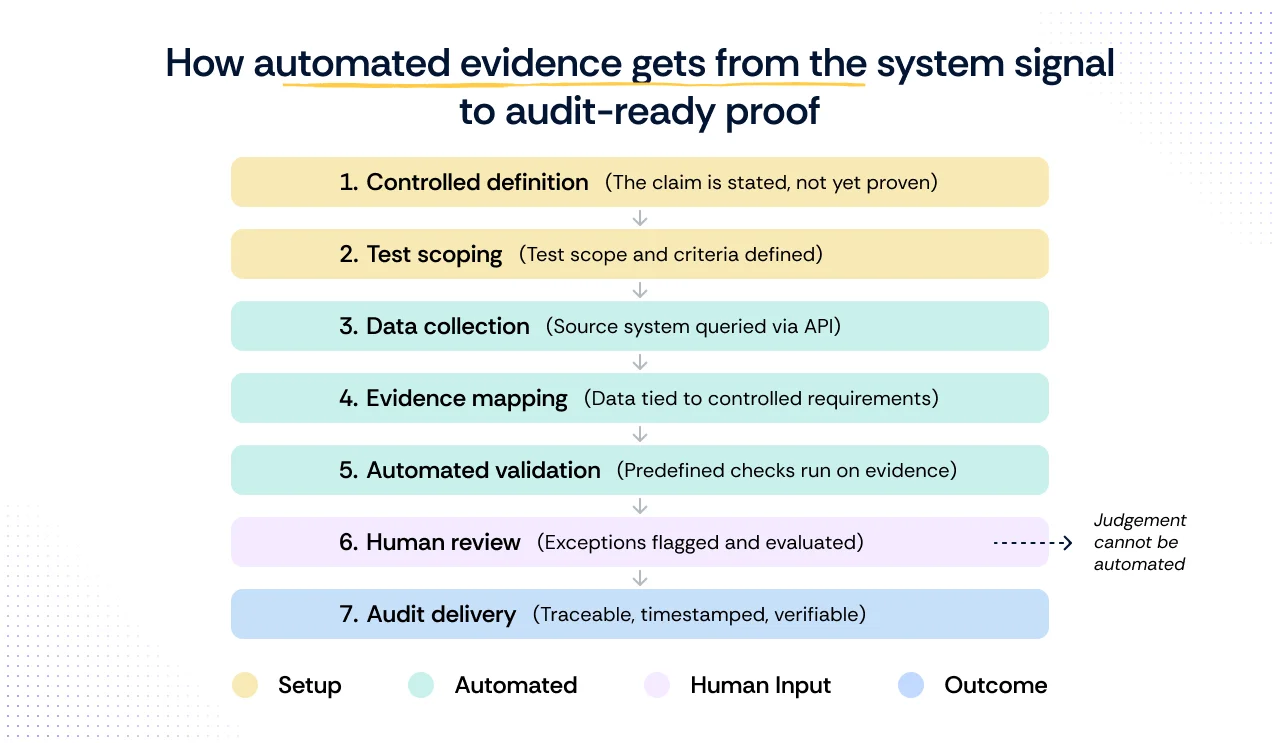
How automated evidence gets from the system signal to audit-ready proof
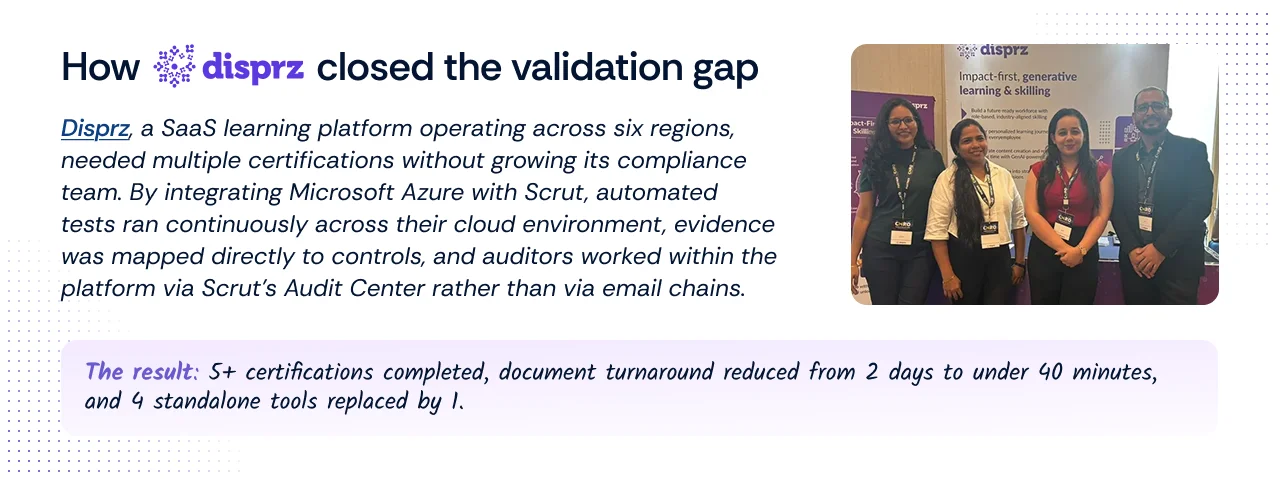
How Disprz closed the validation gap
Every piece of compliance evidence travels through seven steps before it is audit-ready. Each step is a dependency: if an earlier step is incomplete or misconfigured, no amount of automation in the steps that follow can compensate for it.
Step 1: Write a testable control
The control states what the organization commits to. At this stage, nothing has been verified. The control is a position. Its value depends entirely on what happens next.
- What failure looks like: The control is written too broadly or too vaguely to be testable. An auditor asks how the control is evidenced, and no one can produce a consistent answer because the control never specified what proof would look like.
Step 2: Define the test scope and pass/fail criteria
Before any data is collected, someone must define what the test is actually checking: which systems are in scope, which user population applies, what constitutes a pass, and under what conditions exceptions are permitted. This step is overwhelmingly manual, and it is where most evidence gaps originate. A test scoped incorrectly produces evidence that looks complete but fails the audit. No integration can fix a scoping decision that was never made correctly.
- What failure looks like: The test is scoped to active human users, but the control applies to all accounts, including service accounts and shared credentials. The evidence collected is technically accurate but covers the wrong population. The platform shows green. The auditor does not.
Step 3: Connect to the source system and pull data
The platform connects to the relevant source system via API and pulls data on a defined cadence. Data is timestamped at the point of collection. This is where the most complete automation exists, and also where the cadence, credential scope, and silent failure risks apply directly.
- What failure looks like: The integration was set up with credentials scoped to a single environment, but production spans multiple accounts or regions. The platform collects from a subset of in-scope systems and reports it as complete. Alternatively, a token expires mid-audit period, and collection stops silently. The gap only surfaces when an auditor asks for evidence covering weeks where none exists.
Step 4: Map the data to the control requirement
Raw data is linked to specific control criteria across each framework in scope. Pre-built mappings handle the mechanical connection. Whether the data actually satisfies the control's intent, given the scope defined in step two, requires human-configured rules rather than default vendor mappings.
- What failure looks like: The platform maps MFA status across all users to an access control requirement. The requirement applies only to privileged accounts. The mapping is technically present, and the dashboard shows the control as evidenced. An auditor reviewing the artifact finds it covers the wrong population and rejects it.
Step 5: Run automated validation checks against the evidence
Predefined checks evaluate whether the mapped evidence meets the control requirement: correct population, correct time window, no missing accounts, and no gaps in the collection record. These checks surface specific failure conditions. They do not make decisions about them.
- What failure looks like: Validation checks were never configured beyond the vendor defaults. The platform confirms that evidence was collected and mapped, but does not check whether the time window aligns with the audit period or whether the population matches the control scope. Evidence passes internal checks and fails external ones.
Step 6: Review flagged exceptions and document decisions
Automated validation produces a result. Human judgment produces a decision. Whether a flagged exception represents a real gap, a legitimate exception, or a scoping error cannot be determined by a system. A qualified reviewer must assess each condition, document their reasoning, and confirm whether the evidence is sufficient or requires remediation.
- What failure looks like: Exceptions are flagged, but the review queue is not monitored consistently. By the time fieldwork begins, several flagged items have aged without a documented decision. The auditor finds unresolved exceptions with no rationale attached and treats them as open gaps rather than reviewed and accepted risks.
Step 7: Deliver a traceable, timestamped record to the auditor
What reaches the auditor is not a single snapshot. It is a historically traceable record of how the control has performed across the full audit period, with each data point linked to its source system, collection timestamp, and the test logic that evaluated it. The auditor can reconstruct exactly how the evidence was generated, what population it covers, and what exceptions were reviewed and how.
- What failure looks like: The evidence package contains artifacts with no clear provenance: screenshots without timestamps, exports with no source attribution, and exception notes that reference decisions made verbally but never documented. The auditor cannot reconstruct how the evidence was generated and requests a significant portion of it to be reproduced, extending fieldwork and increasing the risk of findings.
Evidence integrity: Why is the correct collection not enough for audit readiness
Most compliance teams treat evidence integrity as a collection problem. Get the right artifact, from the right system, covering the right population, and the work is done. What they do not account for is what happens to that artifact between the moment it was collected and the moment an auditor reviews it.
Evidence integrity is a distinct problem from evidence collection. It asks one question: can you prove that what the auditor is looking at is the same artifact that was generated by the source system, unmodified, with a documented history of who accessed it and when?
In a SOC 2 Type II review, this question becomes particularly pointed. A Type II audit evaluates whether controls operated effectively over a period of time, typically six to twelve months.
An auditor reviewing evidence from month three of a twelve-month period will ask not just whether the evidence is correct, but whether it has remained intact since it was collected. If the platform cannot produce a tamper-evident log of the artifact's history, the evidence is challengeable regardless of how well it was originally collected.
Three integrity risks most programs do not track:
1. Chain of custody breaks between collection and delivery.
An artifact is collected, reviewed internally, and submitted to an auditor months later. At each handoff, it could be renamed, reformatted, summarized, or replaced with a cleaner version.
None of these actions is necessarily malicious, but each one creates a break in the chain of custody that an auditor can challenge.
A platform that logs every access, modification, and export of a collected artifact closes this gap. Most platforms do not.
2. Reformatted evidence loses its provenance.
A raw API export includes fields that an auditor does not need, so a control owner exports a cleaned version to a spreadsheet and submits it instead.
The spreadsheet is accurate, but it is not the artifact that the system generated.
If the auditor asks for the original, and they will in a disputed finding, the cleaned version cannot substitute for it. The program now has to reproduce evidence it should have preserved from the start.
3. Evidence stored outside the platform is unverifiable.
In many programs, a portion of evidence lives in shared drives, email threads, or document management systems outside the compliance platform.
There is no collection timestamp, no access log, and no way to confirm the artifact has not been modified since it was created.
When an auditor questions an artifact stored this way, the only recourse is to regenerate it. That is only possible if the underlying system still holds the original data and the audit period has not closed.
What reliable evidence integrity looks like:

These are not features most compliance teams think to ask for during a platform evaluation. But these are the features that matter most when an audit finding is disputed.
A self-diagnostic checklist for your evidence program

The blog has covered where evidence collection fails in theory. The harder question is whether it is failing in your program right now. Most GRC teams do not know the answer because they have never measured it.
The six metrics below can be run against any compliance program, without a vendor, a new tool, or waiting for the next audit cycle. Each one surfaces a specific failure mode covered earlier in this blog. Together, they give you an honest picture of where your evidence program actually stands.
- Control-to-evidence ratio
- Count the controls in scope for your next audit
- Count how many have at least one piece of evidence collected within the last thirty days via a live integration, not a manual upload
- Divide the second number by the first
- A ratio below 0.6 means more than forty percent of your controls are either unevidenced or relying on manual artifacts. That is not an automation problem. It is an audit risk already sitting in your program.
- Evidence freshness
- For your last completed audit, calculate the median age of evidence at the point it was submitted to the auditor
- Age is the number of days between when the artifact was generated and when it was submitted
- Evidence older than ninety days at submission is a signal that collection is happening on a pre-audit schedule rather than continuously
- For a twelve-month audit period, the auditor will ask about the eleven months not covered by a fresh artifact
- Integration versus manual split
- Pull your evidence inventory and tag each artifact as either integration-generated or manually uploaded
- Calculate the percentage of each
- A program where more than thirty percent of evidence is manually uploaded is more exposed to provenance challenges than the dashboard suggests
- Manual evidence has no collection timestamp tied to a source system, no tamper-evident log, and no way to verify currency without regenerating it
- Human hours per audit cycle
- Estimate the total hours spent on evidence-related tasks in the last audit cycle: collection, chasing control owners, formatting artifacts, responding to auditor requests, and reproducing rejected evidence
- This number has two uses: it tells you what automation has and has not replaced in your program, and it gives you a baseline for evaluating whether a platform investment is actually reducing labor or just relocating it from spreadsheets to a dashboard
- Multi-framework reuse rate
- If you are managing more than one framework, count how many controls satisfy requirements across multiple frameworks from a single piece of evidence
- Divide that by the total number of framework-control pairs you are managing
- A low reuse rate means your team is collecting duplicate evidence for overlapping requirements
- This is one of the most common and least discussed sources of compliance overhead in mature programs, and it compounds directly with manual collection
- First-auditor-review failure rate
- In your last audit, count how many evidence artifacts were questioned, rejected, or required supplementation after the auditor's first review
- Divide by the total number of artifacts submitted
- This is the most honest signal in the diagnostic. Internal validation tells you whether your evidence passed your own checks. First-auditor-review failure rate tells you whether it passed the checks that actually matter
- A rate above fifteen percent is a strong indicator that validation, scoping, or sufficiency judgments are breaking down somewhere in the chain
Run these six metrics before your next audit cycle begins. The results will tell you more about where your evidence program is exposed than any vendor demonstration will.
Continuous vs point-in-time evidence: Why the distinction matters
Not all evidence works the same way, and the difference has direct implications for how much of your compliance program can realistically be automated.
Understanding which controls generate continuous evidence and which produce point-in-time evidence is one of the most practical ways to set accurate expectations before you evaluate any platform.
The table below maps out that distinction.
The critical insight here is that automation enables continuous visibility where it is applicable. It does not make every control continuous. A policy review requires a human decision at a defined interval. Automation can track and remind, but it cannot replace the review itself.
How to evaluate automated evidence collection tools
When assessing any automated compliance software, the marketing will always lead with breadth of integrations and framework coverage. The questions worth asking go deeper than that.
- Does the platform pull evidence directly from source systems via API, or does it rely on manual uploads?
- When data is collected, is it automatically mapped to the relevant control requirements, or is someone manually linking evidence to controls?
- Can the platform produce a continuous, timestamped record of control performance across the full audit period?
- Does the platform alert teams when an integration breaks, a test fails, or evidence collection is interrupted?
- Can every piece of evidence be traced back to its source system, with a clear record of when it was collected and how it maps to the control it satisfies?
A platform that cannot answer yes to all five is automating part of the problem, not the whole of it. And if the evidence it produces cannot be traced back to its source system, cannot be verified as current, and requires a human to compile it, it is not automated evidence. It is organized manual work.
How Scrut approaches automated evidence collection
Most platforms automate file collection. Scrut automates the evidence system behind it, so audit evidence is not just easier to collect but easier to trust.
Scrut’s model works across three layers.
- First, integrations. Scrut connects to the systems where controls operate, including AWS, Azure, GCP, Okta, Azure AD, GitHub, Jira, HRIS, and ticketing tools, with 100+ prebuilt integrations. Evidence is pulled through APIs on defined cadences, so control records reflect live system state instead of screenshots.
- Second, mapping. Evidence flows into Scrut’s Unified Control Framework, with 1,500+ pre-mapped controls across SOC 2, ISO 27001, HIPAA, PCI DSS, and 60+ other standards. One mapped control can support multiple framework requirements, reducing duplicate work when new standards come into scope.
- Third, validation. Automated tests continuously check evidence for control drift, such as deprovisioning gaps, misconfigurations, expired keys, or access policy issues. Scrut Monitor also checks the evidence pipeline itself, so missing or unusual evidence runs are caught before audit fieldwork.
The result is a traceable, continuously refreshed record of control performance, linked from framework requirement to control to system signal. Audit logs, standardized CSVs, and historical views preserve provenance and show how findings and risks evolve over time.
For CISOs, evidence collection stops being a quarterly fire drill. Scrut handles retrieval, mapping, monitoring, and exception detection, while teams focus on scoping, risk decisions, control design, and auditor, customer, and board conversations.
This is the operating model Scrut runs internally and across 2,500+ customers, monitoring 10 million+ assets every month.
Want to see how this works in practice? Take a guided product tour of Scrut and explore automated evidence collection control by control.
Automated evidence collection is the practice of pulling data directly from source systems via API, mapping that data to specific control requirements, and validating it continuously against defined rules. The defining characteristic is not that the evidence is collected without manual effort, which is the easy part. It is that the evidence can be traced back to its source system, scoped correctly to the control, and verified as current at any point during the audit period without human reconstruction. If any of those three properties is missing, what you have is organized manual evidence, not automated evidence.
Evidence tied to continuous system behavior, such as access logs, configuration states, and activity records, can be largely automated. Point-in-time evidence, such as policy approvals, access certifications, and vendor assessments, can be automated for tracking and reminders, but evaluation and sign-off require a human in the loop.
Yes, provided it meets sufficiency requirements. Evidence needs to be traceable to its source system, scoped to the correct population, current within the audit period, and free of collection gaps. Automated evidence that meets these criteria is generally considered more reliable than manually compiled screenshots or exports.
The decisions cannot be automated. Test scoping, exception handling, access certifications, policy evaluations, and vendor risk decisions all require human context and human judgment. Automation surfaces the information needed to make these decisions and tracks that they were made. It cannot make the decision itself, and any platform that suggests otherwise is one to evaluate carefully.
Run the six metrics that we suggested in the self-diagnostic section of this blog i.e., control-to-evidence ratio, evidence freshness, integration versus manual split, human hours per audit cycle, multi-framework reuse rate, and first-auditor-review failure rate. No vendor or new tool required.


%201.png)




.png)