

%20(1).png)


Every March 31, World Backup Day rolls around to remind people to back up what they do not want to lose. Family photos, personal files, old laptops that still hold something important somewhere.
For cloud-first companies, the stakes are a little higher.
Losing production data, customer records, or critical system configurations can bring operations to a halt. And for security and compliance teams, it is not just about avoiding data loss. It is also about being able to prove to auditors that the right backups exist and that they work.
Backup is more than an IT housekeeping task. It is a core compliance control tied to system availability, resilience, and data protection across frameworks like SOC 2, ISO 27001, HIPAA, and PCI DSS. Tracking backup coverage and restoration evidence across all of these simultaneously is exactly where compliance automation software pays for itself, automatically collecting proof and flagging gaps before your auditor does.
So what exactly should compliance teams be backing up? How often should those backups run? And what kind of proof do auditors actually expect to see?
Let’s break it down.
What exactly needs to be backed up?
When people hear “backup,” they usually think of databases. Auditors think about it much more broadly.
They look at whether an organization can restore systems, environments, configurations, and logs needed to bring operations back online after an incident.
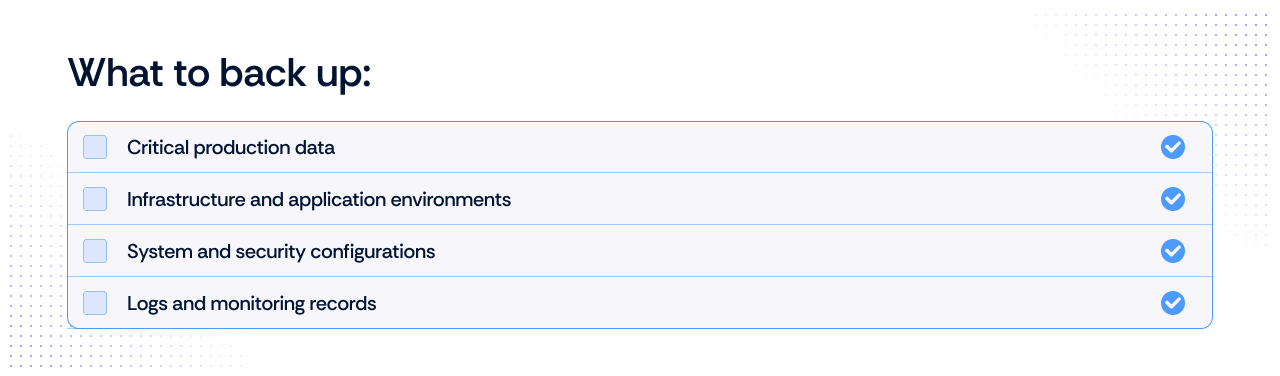
Here is the short checklist most compliance teams should work from.
1. Production data
This is the obvious one and usually the first thing auditors ask about.
It includes things like:
- Customer and user data
- Production databases
- Transaction records
- Uploaded files or documents
- Application-generated data stored in cloud storage
If losing it would affect customers or business operations, it belongs in your backup scope.
2. Infrastructure and system environments
Restoring a database is only part of the recovery process. If the infrastructure that runs the application is down, the system will still not come back online.
Many teams now back up infrastructure using snapshots or infrastructure-as-code repositories.
Common examples include:
- Virtual machine or server snapshots
- Container images and registries
- Infrastructure-as-code repositories (Terraform, CloudFormation, etc.)
- Deployment pipelines and configuration templates
Having these backups allows you to rebuild environments quickly rather than reconstructing them manually.
3. Configuration and access settings
Configuration is often the missing piece during disaster recovery.
Without it, teams may have the data but still struggle to restore the application environment correctly.
Important configuration backups include:
- Identity and access management settings
- Network and firewall configurations
- Security group policies
- SaaS platform configurations
- Application environment variables
These settings can be just as critical as the data itself.
4. Security logs and monitoring data
Compliance frameworks frequently require organizations to retain logs for investigation and audit purposes.
That means logs also need protection from loss.
Typical examples include:
- Authentication and access logs
- System and application logs
- Security monitoring data
- SIEM archives
If an incident occurs, these records are often essential for understanding what happened.
How often should backups run?
Once you know what needs to be protected, the next question is timing. Most compliance frameworks do not prescribe an exact schedule. You will not find a rule that says, “Run backups every six hours.”
Instead, frameworks expect organizations to define frequency based on Risk, Data Sensitivity, and Recovery Objectives.
The guiding metric: Recovery Point Objective (RPO)
For compliance and security teams, the key concept that determines backup frequency is the Recovery Point Objective (RPO). RPO defines how much data loss your organization can tolerate if a system fails.
In simple terms, it answers the question: How much recent data must we be able to recover?
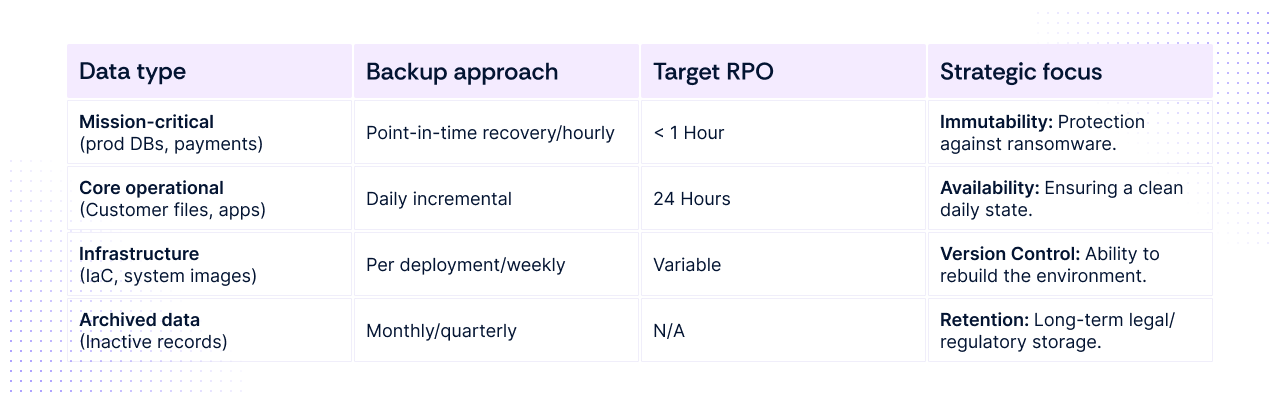
If losing one hour of data is unacceptable, backups must run at least hourly (or use continuous data protection).
If losing a day’s worth of data is manageable, daily backups are usually sufficient.
Tiered backup strategy
In practice, modern organizations tier their backup schedules based on the business impact of the specific system.
Beyond frequency: What auditors actually look for
Frequency alone is not enough to pass an audit. As of 2026, auditors have moved away from “point-in-time” evidence (like a single screenshot of a settings page) and now look for a lifecycle of reliability. You must provide evidence that:
- Jobs run consistently: A centralized dashboard or log showing a 100% success rate (or documented fixes for gaps) over the entire audit period.
- Failures are remediated: Proof of an "Alert-to-Ticket" workflow. If a backup failed on a Tuesday, the auditor will want to see the Jira or ServiceNow ticket showing it was investigated and resolved.
- Backups are secure and immutable: Evidence that backups are stored in a separate security domain and cannot be deleted or encrypted by the same credentials used for production.
- Restoration is validated: This is the "Evidence Gap." You must provide restoration logs showing that you periodically restore data from the backup into a test environment to ensure it isn't corrupted.
What major compliance frameworks expect from backups
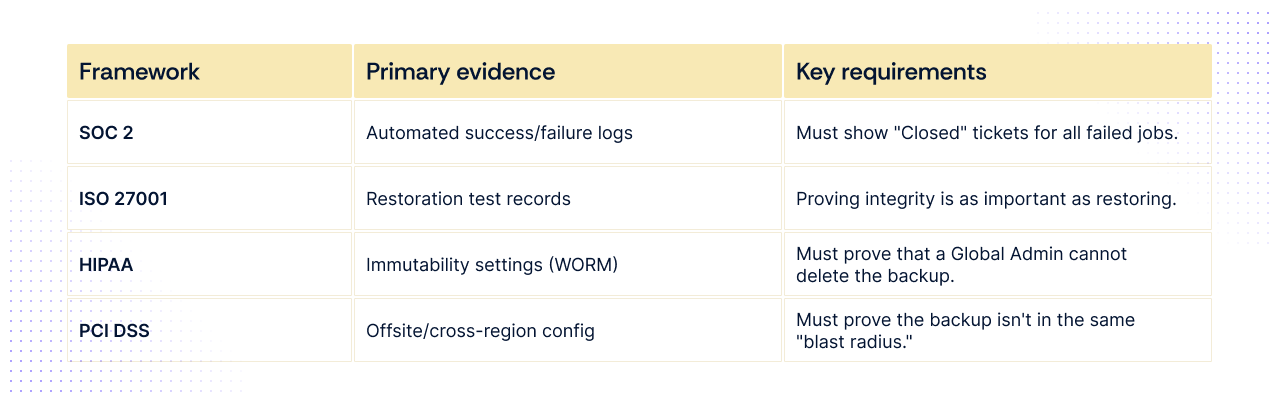
While the high-level goal of all frameworks is data availability, the specific evidence and technical requirements vary significantly. As of 2026, the focus has shifted from having a backup to proving recovery.
1. SOC 2 (Availability & Security Criteria)
SOC 2 is about commitments. If your SLA (Service Level Agreement) promises customers 99.9% uptime, your backups must support that.
- Frequency: Not mandated, but daily is the baseline for most SaaS. If you have high transaction volumes, auditors expect hourly or Point-in-Time Recovery (PITR).
- Key Requirement: Alerting & Non-conformity. Auditors don't just want to see successful backups; they want to see the "failed" ones and the ticket showing you fixed them.
- Evidence: * System-generated logs showing a 100% success rate (or remediation) for the audit window (usually 6–12 months).
- A screenshot of your backup configuration (e.g., AWS Backup or Veeam settings).
2. ISO 27001 (Control A.8.13)
ISO 27001 is a risk-based framework. You must prove your backup frequency matches the "Business Impact Analysis" (BIA) you performed.
- Frequency: Must align with your documented RPO. If your BIA says a system is "Critical," the auditor will flag a 24-hour backup cycle as insufficient.
- Key requirement: Restoration testing. ISO 27001:2022/2026 updates place heavy emphasis on "Proof of Recovery."
- Evidence: * Restoration test logs: A documented record (date, system, result, operator) of a successful data restore performed in the last 6 months.
- Asset-to-backup mapping: A list showing every critical asset and its corresponding backup job.
3. HIPAA (Security Rule - Modernized 2026)
HIPAA now carries a specific "Capability" mandate. It is the most prescriptive regarding the speed of recovery.
- Frequency: Daily is the absolute minimum for Electronic Protected Health Information (ePHI).
- Key requirement: The 72-hour rule. You must demonstrate the capability to restore critical systems within 72 hours of an incident.
- Evidence: * Immutable backup proof: Evidence that backups are stored in a "Write Once, Read Many" (WORM) state to prevent ransomware from deleting them.
- Disaster recovery (DR) drill report: A formal document proving you simulated a system failure and recovered within the 72-hour window.
4. PCI DSS (Requirement 12.10)
PCI DSS focuses on Cardholder Data (CHD) and the "Incident Response" lifecycle.
- Frequency: Daily for all systems in the Cardholder Data Environment (CDE).
- Key requirement: Offsite & redundant. Backups must be stored in a separate location (physical or logical) from the primary data.
- Evidence: * Network diagrams: Showing that the backup server is on a different segment than the production CDE.
- Media inventory: If using physical media (rare in 2026), a log of media movement to off-site storage. If cloud, a configuration report showing cross-region replication.
Where backup compliance usually breaks down
Most companies do not fail audits because backups are missing entirely. The problems usually appear in the details of how backup programs are implemented and maintained over time.
Across SOC 2, ISO 27001, HIPAA, and PCI audits, the same few issues show up repeatedly.
Backups exist, but restoration is never tested
Many teams assume that if backups complete successfully, recovery will work when needed.
Auditors no longer accept that assumption.
If a company cannot demonstrate a recent restoration test, the backup program is considered incomplete. Restoration exercises are what prove that backups are not corrupted, misconfigured, or missing dependencies.
A simple restore test log typically includes:
- Date of restoration test
- System or dataset restored
- Target test environment
- Outcome (success or failure)
- Person responsible for verification
Without this evidence, auditors cannot verify that recovery would actually succeed during an incident.
Critical systems are missing from the backup scope
Backup policies often start with databases and gradually expand over time. But gaps frequently remain, especially around infrastructure configurations, access settings, and logs that are just as critical during recovery.
Auditors regularly find that important operational components are not covered, including:
- Infrastructure-as-code repositories
- IAM or identity configuration settings
- CI/CD pipeline definitions
- SaaS application configuration data
When these components are missing from the backup inventory, recovery becomes slower and more error-prone.
That is why most auditors now expect to see an asset-to-backup mapping, showing how every critical system is protected.
Backup failures are not tracked or resolved
Backup systems fail occasionally. Network interruptions, storage limits, or permission changes can cause scheduled jobs to fail.
The problem arises when failures go unnoticed.
Auditors increasingly look for proof that organizations monitor backup outcomes and respond to failures through a formal process.
Typical evidence includes:
- Backup monitoring dashboards or reports
- Alert notifications for failed jobs
- Incident or ticket records showing investigation and resolution
If backup failures appear in logs but no remediation is documented, auditors may flag the control as ineffective.
Backup storage is not properly isolated
Ransomware attacks increasingly target backup infrastructure.
If attackers gain access to the same administrative credentials used for production systems, they may be able to delete or encrypt backup data.
For this reason, auditors now expect evidence that backups are protected through measures such as:
- Immutable storage settings
- Separate backup accounts or security domains
- Cross-region or offsite replication
- Restricted administrative access
Without this separation, backups may not survive the same incident that destroyed the production system.
Turning backups into continuous compliance
At this point, most security teams understand the importance of backups. The challenge is maintaining visibility across dozens of systems, jobs, and storage environments.
To satisfy modern audits, organizations must demonstrate three things consistently:
- Backups run according to defined policies
- Failures are detected and remediated
- Restoration works when tested
This is why many compliance teams are moving toward automated evidence collection and continuous monitoring of backup-related controls. Instead of collecting screenshots right before an audit, teams track backup jobs, capture logs automatically, and document restoration tests as they occur.
Platforms like Scrut help compliance teams centralize this process by mapping backup evidence directly to controls across frameworks like SOC 2, ISO 27001, HIPAA, and PCI DSS. This helps ensure backup activity is documented automatically and remains audit-ready throughout the year.
Ready to start turning backup activity into continuous compliance evidence? Schedule a demo with Scrut to see how automated evidence collection keeps your team audit-ready year-round.
Most frameworks expect organizations to back up any data required to restore business operations. This typically includes production databases, application files, infrastructure configurations, and security logs. The exact scope should align with the organization’s risk assessment and business impact analysis.
Most frameworks do not mandate a fixed schedule. Instead, they expect backup frequency to match the organization’s Recovery Point Objective (RPO) and data criticality. Mission-critical systems may require hourly backups or point-in-time recovery, while less critical data may only require daily backups.
Yes. Many frameworks now emphasize restoration testing. Auditors often request evidence that backup data was successfully restored in a test environment to confirm the data is usable and not corrupted.
Common evidence includes: Backup job success and failure logs Backup configuration settings Restoration test records Incident tickets for failed backup jobs Documentation showing off-site or immutable storage
Backup evidence is often spread across multiple tools and cloud services. Collecting logs, screenshots, and restoration records manually for every system can take significant time during an audit. Automation helps centralize this evidence and keep it continuously audit-ready.


%201.png)




.png)