


%20(1).png)


If you're a risk manager, you know the frustration of trying to cram a complex risk methodology into a simplistic formula. The risk landscape is too dynamic for cookie-cutter formulas, so your scoring approach needs to be just as flexible.
Many GRC tools only allow basic arithmetic (like a fixed ‘Likelihood’ × ‘Impact’), forcing teams with mature risk models to find workarounds. The result? Teams resort to external spreadsheets to compute “true” risk scores, introducing version control issues, extra manual effort, potential errors, and risk scores that can’t be defended in audits.
It’s no surprise to note how FERMA’s 2024 Global Risk Manager Survey found that nearly 50% of risk managers still rely on spreadsheets for KRI monitoring, risk quantification, mitigation, and reporting, while just 15% use an integrated risk management information system.
The more your risk model lives in Excel instead of your GRC platform, the more manual work, inconsistency, and audit headaches you face. It’s 2025, and the threat landscape isn't getting any kinder. No wonder organizations are pouring resources into better risk management solutions.
Did you know that enterprise GRC software is projected to be a $72B+ market by 2025, with risk management modules alone accounting for roughly a quarter of eGRC software spend? But all that investment means nothing if your tools force a one-size-fits-all approach that doesn’t match how you actually assess risk.
Advanced risk scoring: Configure risk your way in Scrut
.webp)
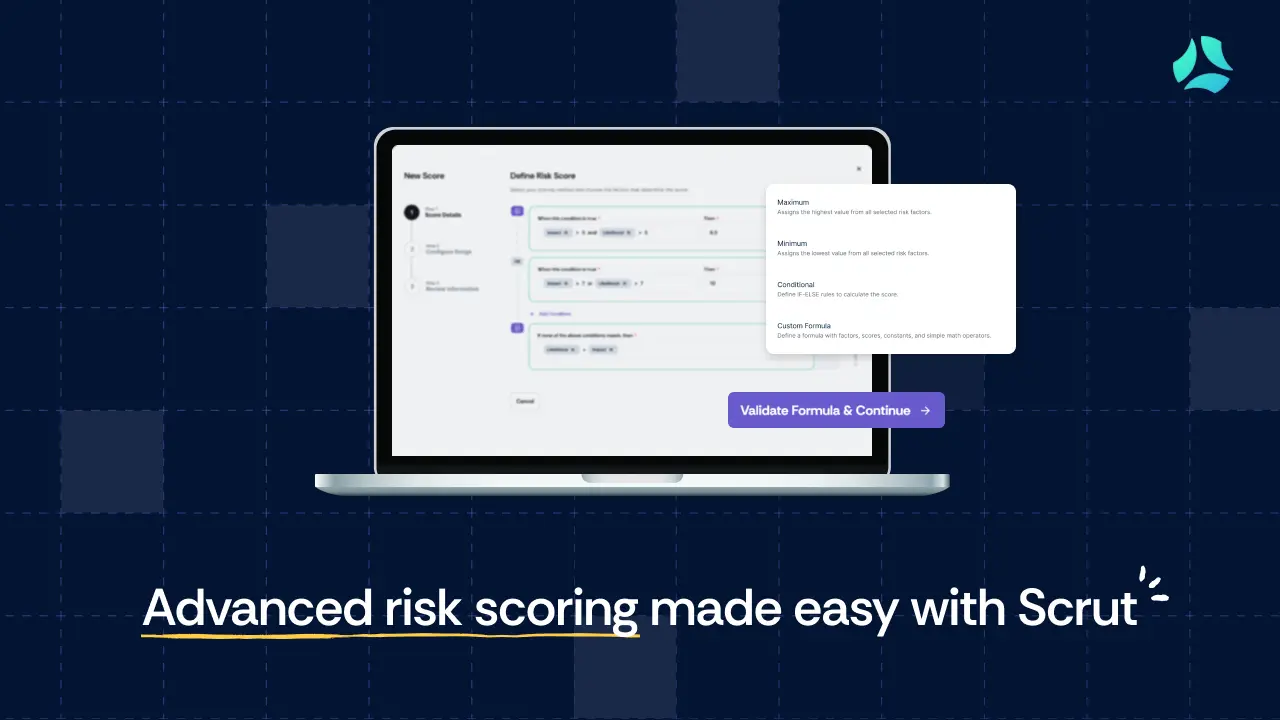
Scrut’s new Advanced Risk Scoring feature puts an end to the one-formula-fits-all dilemma. It’s a new, configurable risk-scoring engine that lets you design risk calculations the same way your organization already does in spreadsheets or policy, but directly within Scrut.
Instead of forcing every risk into a single, pre-built scoring method, you can now pick from three flexible scoring methods upfront when configuring a new risk score:
- Maximum (MAX)
- Minimum (MIN)
- Conditional logic (IF-THEN)
In other words, the platform adapts to your risk model, not the other way around. This capability is built for GRC and security teams who have nuanced scoring criteria (often maintained in spreadsheets until now) and need their tool to keep up.
See how Scrut helps organisations of all sizes, from startups to multi-entity enterprises, manage risk in one place.
New risk scoring methods: When to use?
When configuring a new risk score, you’re usually dealing with two or more factors (such as Impact and Likelihood) that together will make up the risk score. To help you decide which risk scoring method to use (and when), we have broken it down for you:
1. Maximum (MAX): When the worst-case should decide
What it does: Maximum scoring looks at all the factors you’ve selected for a risk (for example, Impact and Likelihood) and uses the highest value as the final score. This is especially useful for technical risks where one dimension (like exploitability or data sensitivity) can make the entire scenario unacceptable on its own.
When to use it: Use MAX when you don’t want serious issues to get averaged away:
- A single factor crossing your “unacceptable” threshold should elevate the whole risk
- You care about worst-case exposure more than a balanced average
- You want to make sure severe-but-infrequent risks still rise to the top
Example
- Likelihood = 4
- Impact = 9
- Risk Score = 9
Scenario: You’re looking at a production server with multiple vulnerabilities. Most findings are medium, but one is a critical CVSS 9. With MAX scoring, the server’s risk score becomes 9, because the most severe vulnerability drives the rating. You don’t risk “hiding” a critical issue behind other milder factors.
2. Minimum (MIN): When all factors must agree that it’s high

What it does: Minimum scoring takes the lowest value among the selected factors and uses that as the final score. MIN helps you maintain a more realistic and balanced risk profile, so you don’t crowd dashboards with items that are annoying but not truly dangerous.
When to use it: Use MIN when you want to avoid over-escalating risks that are loud in one dimension but inherently limited in impact:
- You only want a “High” rating when all key factors are high
- You’re dealing with frequent but low-impact issues
- You want to keep your register focused on risks that are genuinely material to the business
Example
- Likelihood = 7
- Impact = 3
- Risk score = 3
Scenario: A weekly log review sometimes gets delayed. It happens often (Likelihood 7), but the worst outcome is a minor reporting delay (Impact 3). With MIN scoring, this stays a low risk. It’s visible, but it doesn’t compete for attention with incidents that could actually harm customers or revenue.
3. Conditional Logic (IF–THEN): When rules (not averages) drive severity
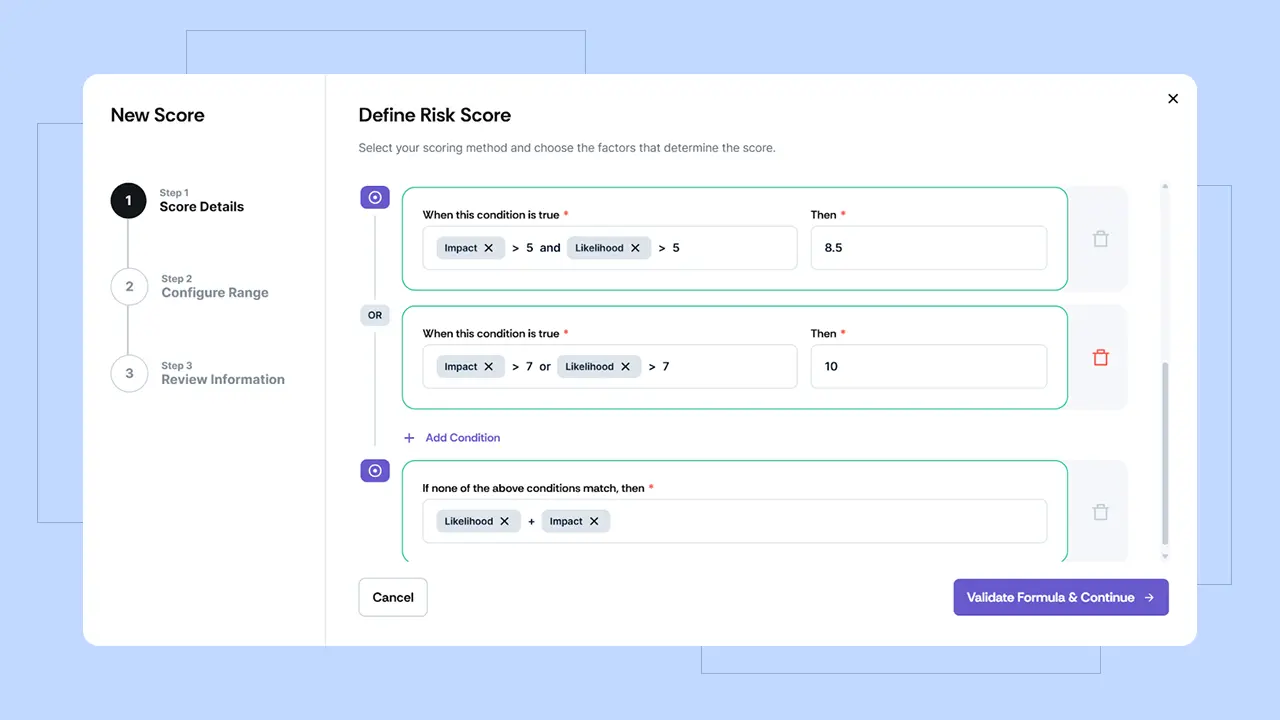
What it does: Conditional scoring lets you build IF/THEN rules that mirror your internal playbooks. Scrut supports standard comparisons (==, !=, >, <, >=, <=), logical operators (AND, OR, NOT), and arithmetic (+, -, *, /, ^) on integer inputs. That means most of the IF-based logic you’re using in spreadsheets today can be encoded directly in the platform.
When to use it: Use Conditional logic when your scoring model already lives in rules and thresholds, for example:
- “If it’s internet-facing and touches production data, it’s at least High.”
- “If a vendor handles payment card data, it must be escalated.”
- “If both impact and likelihood cross a certain point, it’s always Critical.”
Example
A single conditional logic risk score may have multiple conditions. Here is one such example:
- If Impact > 7 AND Likelihood > 6 → THEN Score = 10 (Critical)
- OR if Impact > 5 AND Likelihood > 5 → THEN Score = 8 (High)
- Else → Impact (1) + Likelihood (2) → Score = 3 (Low)
Scenario: Your incident response policy says that any risk that is both ‘highly likely’ and ‘highly impactful’ must be treated as Critical, regardless of other nuances. With Conditional scoring, you don’t have to rely on someone “remembering” this in a meeting. The rule is configured once in Scrut, and every time a risk meets those criteria, it’s automatically scored as Critical.
How does it work in Scrut?

Using these advanced scoring methods in the Scrut platform is straightforward.
When you create or edit a risk in Scrut, you first select a Score Calculation Method from a new dropdown (Maximum, Minimum, Conditional, or Custom Math). The interface then tailors the configuration options based on your choice.
Scrut even includes a “Validate Formula” function to check your conditional logic for errors before you save it, so you’re not flying blind.
Once your scoring configuration is set, the platform applies it automatically whenever that risk is assessed.
If you are rethinking how you work with auditors and build risk programs that go beyond checklists, tune in to the Compliance Beyond the Checkbox podcast where Beau Butaud and Nicholas Muy take a practical look at risk assessments, auditor expectations, and how to balance automation with human judgment.
The payoff: Accurate, transparent, audit-defensible risk scores
With advanced risk scoring, you don’t need to depend on any other tool for carrying out risk assessments, no matter how complex your formula is.
When you set up the same scoring rules in Scrut that you used to keep in a spreadsheet, you stop juggling parallel files and stop recalculating risk scores manually. Scrut becomes the single source of truth for all your risk scores, meaning every risk is calculated the way you intend.
Here’s what that means for your team:
- Less manual work and fewer errors: No more exporting data to Excel or maintaining parallel calculations. You save time and eliminate the copy-paste mistakes that come with spreadsheet juggling. Your team spends more time addressing and mitigating risks, not doing tedious math gymnastics on the side.
- Consistent and credible scoring: Every risk is evaluated with the same logic you defined, so you get apples-to-apples scores across your risk register. High, Medium, and Low ratings actually mean something specific to your organization, rather than being based on a generic formula.
- Audit-ready transparency: When auditors or executives ask, “Why is this risk rated High?”, you can give a clear answer.Many risk teams also use an AI presentation maker to translate complex scoring The Scrut platform lets you drill into any risk and see exactly which factors and rules produced its score, providing built-in evidence to back up your ratings without any extra effort.
With these new MAX, MIN, and Conditional logic options, Scrut is empowering GRC and security teams to leave behind the limitations of rigid tools and error-prone spreadsheets. Your team gets the flexibility of a spreadsheet with the reliability and consistency of an enterprise platform.
It’s about time our tools caught up with reality, and with Scrut’s new risk scoring capabilities, you can finally trade those one-size-fits-all formulas (and all those Excel sheets) for a solution that actually fits your organization.
If you are still juggling risk scores across spreadsheets and tools and are not sure how to unwind it, you are not alone. Book a demo with us, and we can walk through your current approach together and show how Scrut can help you centralize risk management so that your risk posture is audit-ready.
Advanced risk scoring is a configurable method of calculating risk scores using multiple scoring approaches rather than a fixed formula. Instead of relying only on basic calculations like Likelihood × Impact, organizations can use flexible scoring models that reflect their internal risk policies and assessment logic.
Many risk management tools rely on simplistic formulas, which forces teams with complex risk models to calculate scores in spreadsheets. This creates manual work, version-control issues, and inconsistencies that make risk scores harder to defend during audits.
Scrut’s advanced risk scoring supports Maximum (MAX), Minimum (MIN), and conditional logic (IF–THEN) methods. These options allow organizations to build risk scoring models that match their real-world risk assessment processes rather than relying on a single scoring formula.
Conditional logic allows organizations to define rule-based risk thresholds using IF–THEN conditions. For example, a risk may automatically be marked critical if both likelihood and impact exceed certain values, ensuring scoring aligns with internal risk policies.
Advanced risk scoring helps organizations reduce spreadsheet dependency, ensure consistent risk evaluations, and provide audit-ready explanations for risk ratings. Centralizing scoring logic inside the platform improves transparency and reduces manual errors.


%201.png)